An image and a question go in, a written answer comes out
A vision-language model (VLM) takes an image together with a text question and returns text.
Give one a screenshot of a bar chart and ask what the Y axis measures, and it will find the axis label and tell you in a sentence. A text-only large language model cannot do this, because the picture never reaches it. This piece zooms in on one square of a map of AI model types, the one where an image plus text goes in and text comes out. It covers how the model reads a picture, what it is useful for, where it most often gets things wrong, and how to tell it apart from its neighbours on the map.
How it sees: cut the picture into patches, turn them into words
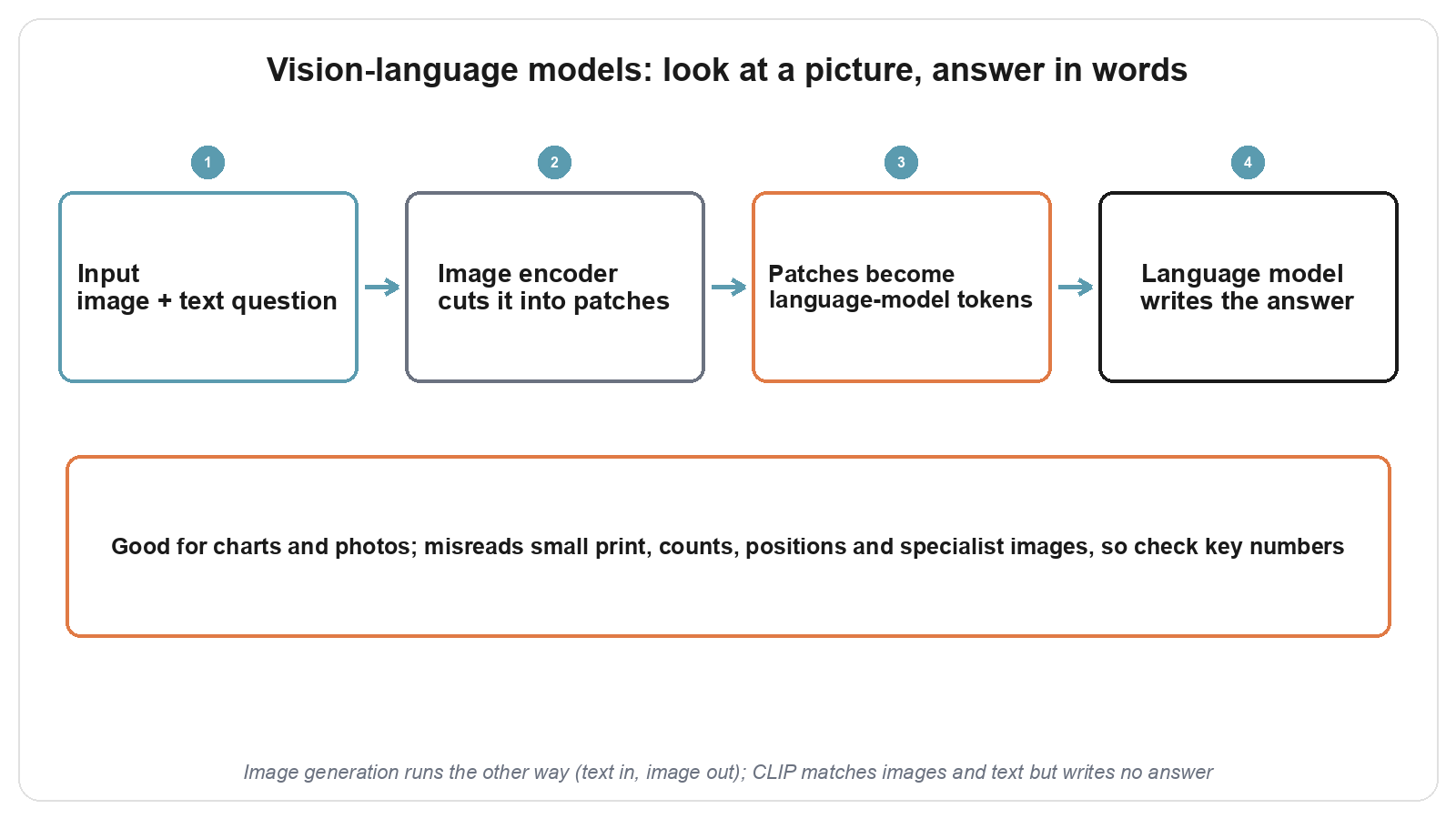
Most vision-language models are two parts joined together: an image encoder and a large language model.
The image encoder first cuts the picture into a grid of small, fixed-size squares, a bit like slicing a photo into jigsaw pieces. The Vision Transformer (ViT) showed that this patch approach works for recognising images directly: each patch becomes a list of numbers, and the model works out how the patches relate to one another. LLaVA takes an existing image encoder (from CLIP) and adds one simple projection layer that reshapes each patch into the same format as the language model's word tokens. Those patch tokens are placed in front of your question. To the language model they read like a special stretch of text, and once it has read them it writes the answer word by word, as it always does. LLaVA is then trained on image question-and-answer data so that it learns to follow instructions about pictures.
Flamingo takes a different route. It inserts extra layers inside the language model so that the model can look back at the image while it writes, and it can handle several images mixed in with text.
What it is good for: a first look that reads the picture for you
The everyday uses are describing a photo, reading a screenshot of a table or chart, and pulling text out of a scanned page. Photograph a road sign or a product leaflet abroad, and it can read the words and translate them.
In research it makes a good first pass. Faced with a figure in a paper, you can ask which groups are being compared or what the horizontal axis stands for, get the layout of the figure quickly, and then decide whether to read the paper closely. With a stack of scanned forms, it can turn the fields into text for a person to check line by line.
Where it gets things wrong
It slips most often in five situations.
Tiny print and dense tables of numbers can lead it to misread a digit or pick the wrong column. Ask it how many cells or people are in a picture, and the count is often off. It also tends to miss on precise position, such as which object sits in the top-left corner. With specialist images it rarely saw in training, such as microscopy slides or radiology scans, it can produce a reading that sounds expert and has nothing behind it. And it can describe details that are not in the picture at all, in the same confident tone it uses when it is right.
So any number that will go into a report should be checked against the original image or the underlying data, and specialist images still need a trained reader.
Telling it apart from its neighbours
When choosing a tool, first check whether you have a picture, then decide what kind of output you need.
A large language model accepts only text and cannot see images; if your question does not involve a picture, it is enough. An image generation model runs the other way, taking text in and producing a picture, so reach for it when you want a new image. Among embedding models, CLIP also handles both images and text, but it places them in one shared coordinate space and uses distance to judge which caption fits which picture. That makes it good for searching images with words or grouping them, and it never writes an answer. Looking at a picture and replying in sentences is the vision-language model's job.