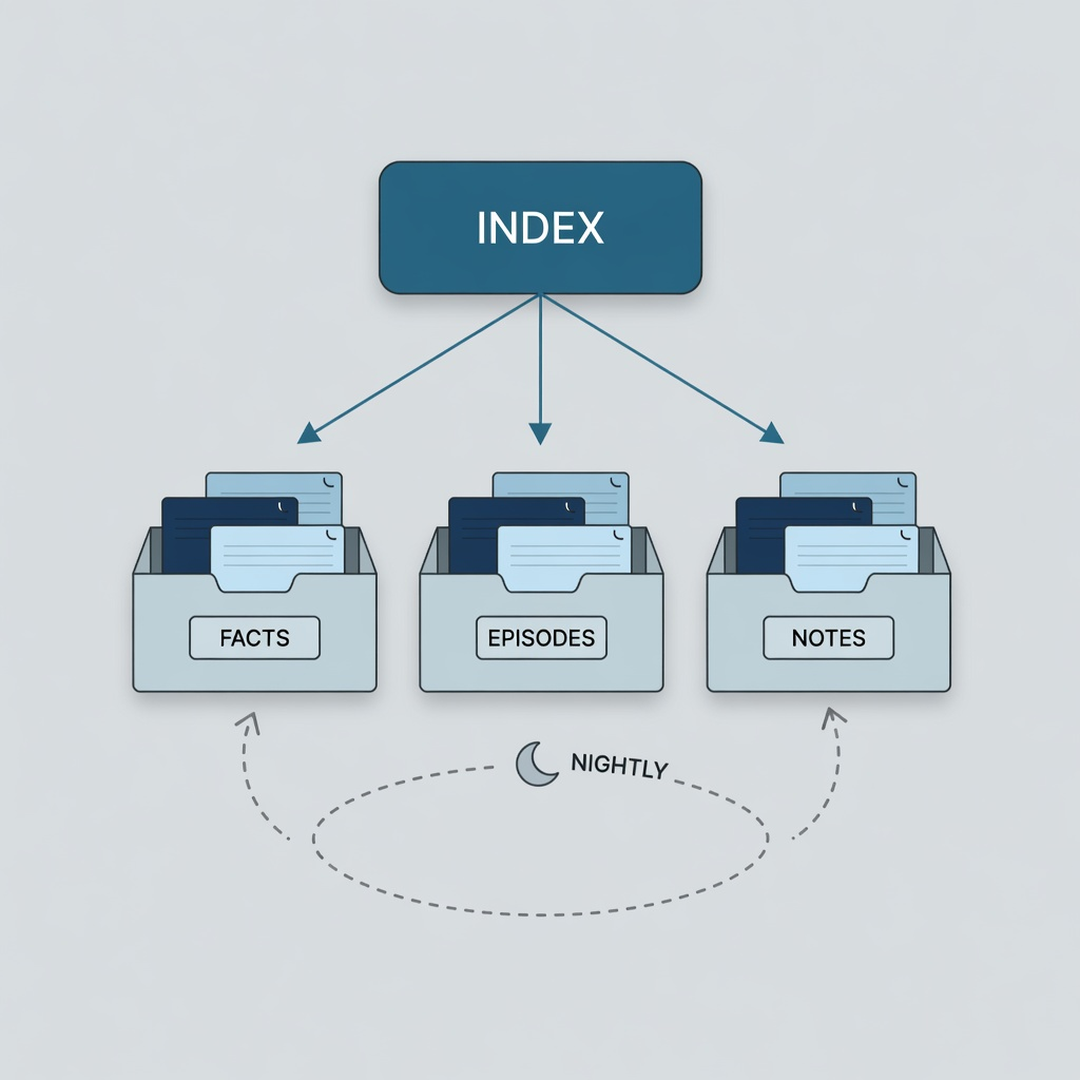
In brief: Does your AI assistant remember last week's lesson, then make the same mistake again this week? We designed a memory system for our own use. It is not an industry-standard approach. Its index is like a doorplate: it only points the way at the right moment. This piece uses six figures to show how it works, and why we designed it this way.
Why design a memory system ourselves?
An AI can store a memory and still fail to recall it. This memory system was designed for that problem.
Every AI CLI session starts from zero. Ghost In Shell is our open-source local memory framework. It adds a shared memory layer for tools such as Claude Code, Gemini CLI, and Codex CLI. After a year of actual use, we had accumulated about 1,000 episodic memories and more than 570 knowledge notes, and we found a problem: an episodic memory clearly said "last week's deploy report succeeded, but production was still the old version," and the next week the AI still looked only at the tool report and declared the job done.
The record existed. It just did not show up at the moment it was needed. Version 5.2 writes that year of fixes into the program.
Where this sits: this is an approach we designed ourselves. It is not necessarily the same as mainstream approaches. Common AI memory setups mostly turn the conversation into vectors and run semantic retrieval, or they use the memory feature built into the AI tool. We took another path. Every memory is stored as a plain-text file (YAML, JSONL, Markdown). Search is keyword matching, plus a hand-maintained trigger-phrase index. We do not use a vector database. A person can read and edit every memory directly, and version control can track it. This choice has a cost. The end of this piece covers it.
The figures below walk through the system in order.
Figure 1: Three roles
The system splits memory into three roles. The index points the way, the store holds the content, and nightly maintenance keeps it.
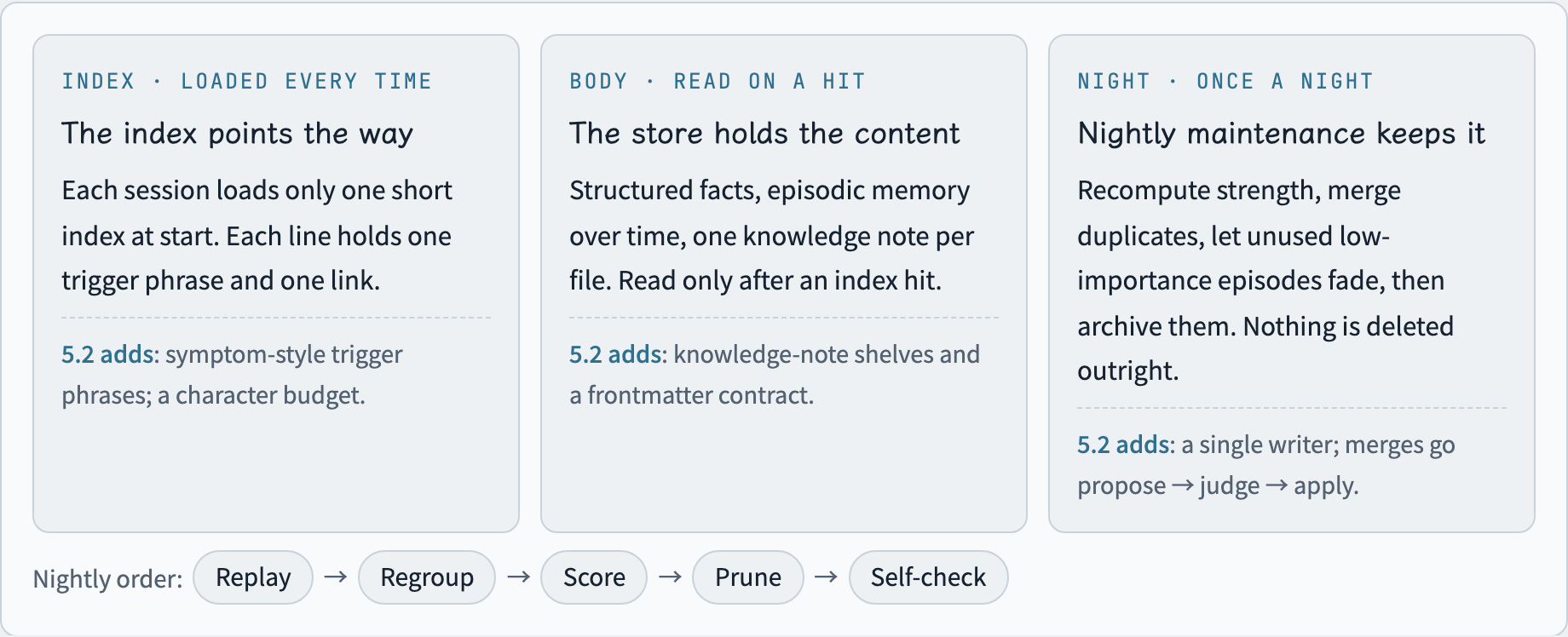
Figure 1. The three roles of the memory system, and where version 5.2 reinforces them.
- The index points the way. At the start of each session, only a short index is loaded. Each line has one trigger phrase and one link. The index is like a library doorplate. It does not hold the content.
- The store holds the content. Structured facts, episodic memory recorded over time, and one knowledge note per file. Those are read only after an index hit.
- Nightly maintenance keeps it. Each night it runs, in order: replay, regroup, score, prune, and self-check. Episodic memories that are low in importance and have gone unused for a long time fade out first, then are archived. They are not deleted directly.
The upper layer stores only links that point downward. It does not copy the content, so the same thing has to be changed in only one place.
Figure 2: Why write the trigger phrase as a symptom?
Write the trigger phrase as the sentence in the AI's head at the moment it makes the mistake, not as the cause of the mistake.
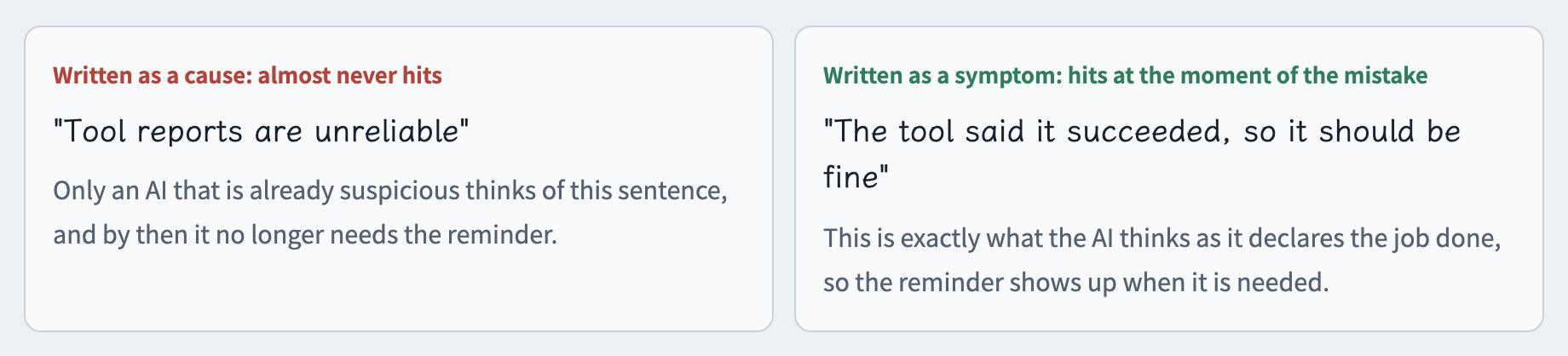
Figure 2. The same reminder, two wordings, and when each one hits.
Each line of the index is one trigger phrase plus one link. A line written as a cause occurs only to an AI that is already suspicious, and by then it no longer needs the reminder. Written as a symptom, the sentence in the AI's head at the moment of the mistake, the reminder shows up when it is needed.
Many failures have two directions. A gate may fail to block, or it may block by mistake. Symptoms for both directions have to be written into the index. Otherwise the other direction can never find an answer.
Figure 3: The startup index has a character budget
When the startup index passes its size cap, the tail is cut off in silence. Hold the budget in characters.
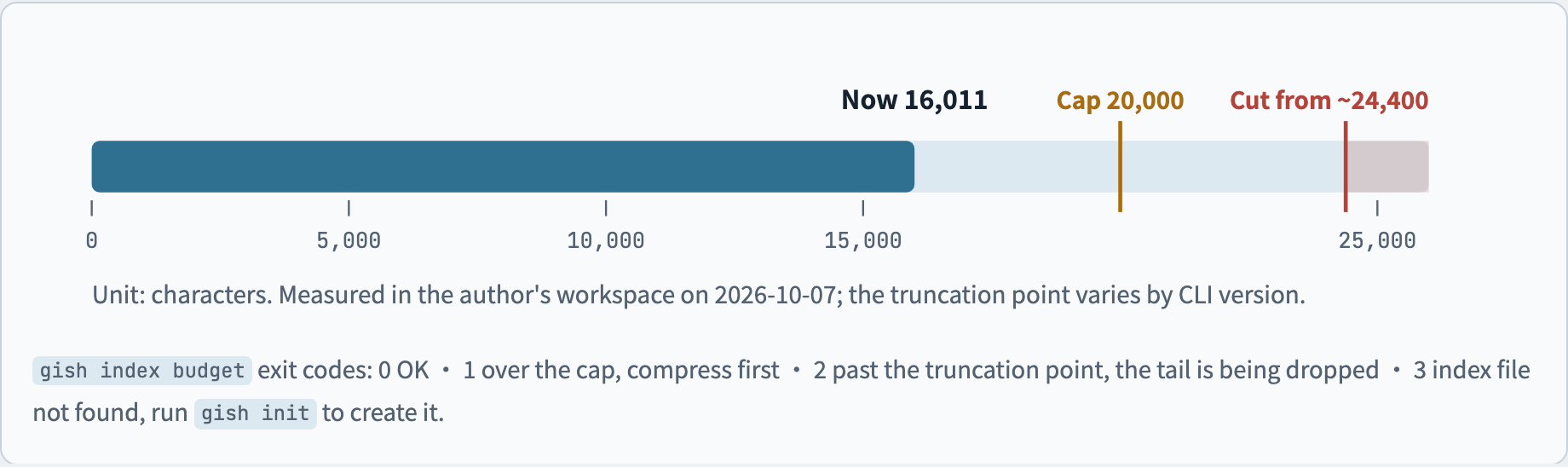
Figure 3. Character level of the startup index. Measured in the author's workspace on 2026-10-07. The truncation point varies by CLI version. Go by a measurement.
Every added index line spends a little of the load budget of every session. As notes pile up, the index grows with them. Once the startup memory file passes a certain size, the CLI we use simply eats the extra tail. There is no warning. What gets dropped is the newest lines. Version 5.2 adds gish index budget, which measures the index in characters, because Chinese and English characters differ a lot in bytes. Measuring in bytes would measure it wrong.
| Exit code | Meaning | What to do |
|---|---|---|
| 0 | Within the cap | You can add a new index line |
| 1 | Over the cap | Compress first, or move entries to the shelf index, then add |
| 2 | Past the truncation point | The tail is being dropped. Deal with it now |
| 3 | Index file not found | Check the workspace path, or run gish init to create it |
Figure 4: Two index tiers, split by whether the AI will look it up
The index has two tiers. The test is whether the AI will go look on its own, not whether the content matters.
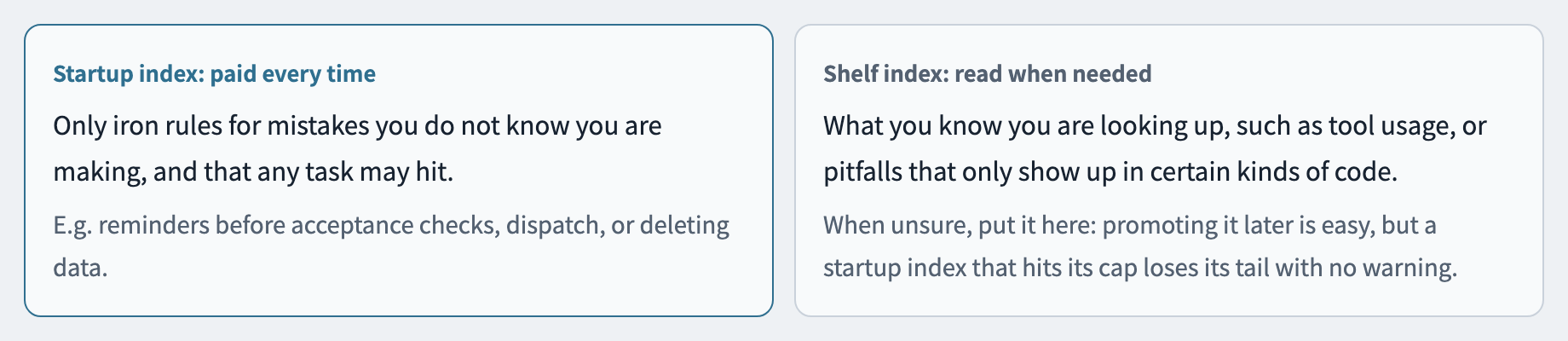
Figure 4. How the two index tiers divide the work.
The startup index is like a note you carry with you. The shelf index is like a reference book that stays in the office. The test is not "does this matter?" It is "will the AI go look this up on its own?" Content such as how to use a tool is something the AI knows it is looking up, so the shelf index is enough. Reminders before an acceptance check, before dispatch, or before deleting data are cases where the AI often does not know it is making a mistake. Those need to be loaded every time. When you are unsure, put the entry on the shelf index first. Promoting it later is easy. A tail that hits the cap and gets cut off comes with no warning.
Figure 5: Merging memory goes propose → judge → apply
A wrong write is more dangerous than a wrong read, so merging memory goes propose → judge → apply.
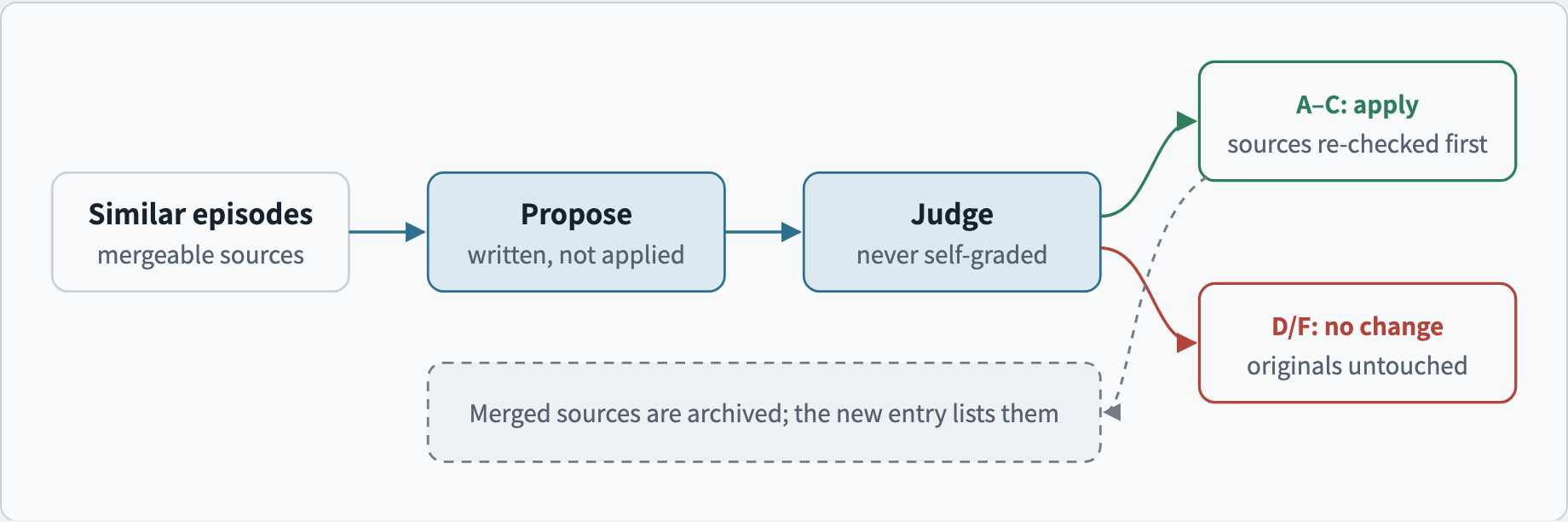
Figure 5. The version 5.2 consolidation flow: propose → judge → apply.
A wrong read affects one answer. A wrong write affects every later session that trusts it. Version 5.2 has three write rules:
- Only one host writes. Other machines can only read. The machine role lives in local configuration. It is not placed in a folder that syncs.
- Propose → judge → apply. The merge step cannot grade itself. If the judgment does not pass, not one line of the original record moves.
- Do not delete. Archive. Original memories that were merged are moved into an archive file. The new entry records which items it was merged from.
Figure 6: No indexed note had zero hits
After measuring 301 sessions, none of the 59 notes the index points to had zero hits.
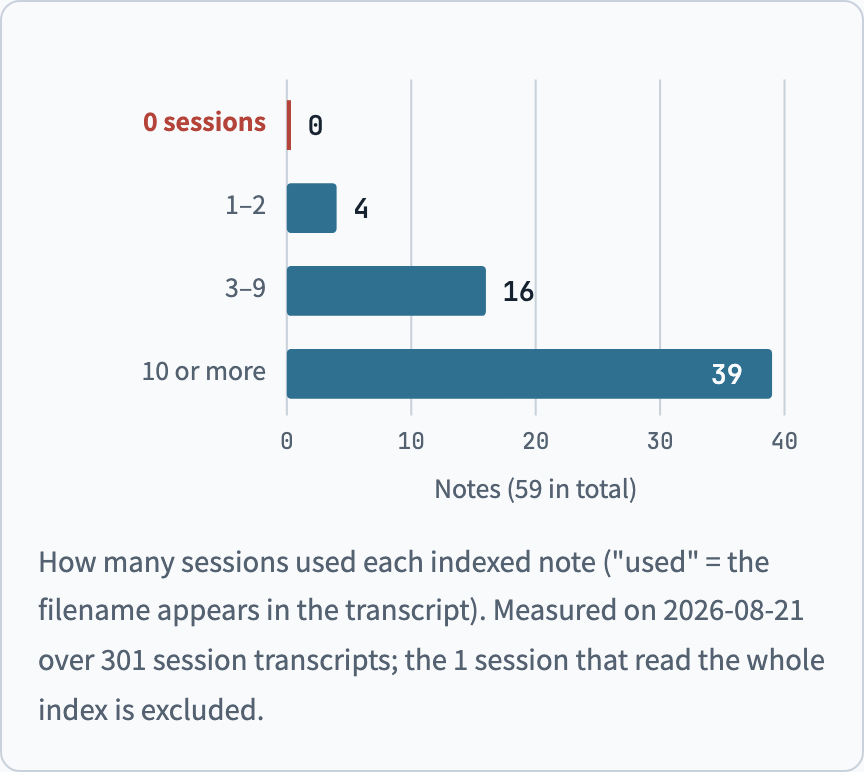
Figure 6. How many sessions used each indexed note. "Used" means the note's filename appears in that session's transcript. Measured on 2026-08-21, from transcripts of 301 sessions and 59 indexed notes. The 1 session that read the whole index has been excluded.
The suggestion "let's compress the memory index; there must be a lot of stale entries in there" kept coming back. We finally compared the transcripts of 301 sessions, entry by entry. Not one note had zero hits. The set of things to clean up is empty.
What matters more is this: the most important iron rules are rarely looked up, because the AI does not know it is making a mistake. Cutting iron rules by how often they are used is like removing your own brakes.
Six pitfalls at a glance
Six pitfalls from this year. The detailed account is in another article on the year's lessons. This section is only the quick-reference table.
| The sentence in the AI's head at that moment | Lesson | Check |
|---|---|---|
| "The tool said it succeeded, so it should be fine" | A tool report is only a claim, not evidence | Where the user will actually look, read the final state yourself |
| "The error count is 0, so there is no problem" | 0 can also mean that step never ran | Pair it with a signal that the run really finished |
| "We wrote that check a long time ago" | Zero call sites means dead code | Count the call sites. After subtracting definitions and tests, how many are left? |
| "Memory says this tool does not support that" | A negative sentence is a dated snapshot | Add expires to the note. When a search finds nothing, attach the keywords that were tried |
| "Let's compress the memory index" | Measure the denominator before you start | A zero needs two independent counts to agree |
| "The conclusion that came back is exactly what I thought" | An idea that has not been checked should be written as a question | Compare it with the original records, not with your own expectation |
Trade-offs of this approach
Plain-text files plus a trigger-phrase index are easy to read and easy to edit. They also carry a maintenance cost and limits on retrieval.
We chose plain-text files and a trigger-phrase index because several AI CLIs share the workspace. We want every memory to be readable by a person, editable directly, and, when something goes wrong, traceable to the write that caused it. The choice has a clear cost:
- The index needs continued maintenance. A weak trigger phrase means no hit. When you add a knowledge note, you have to decide which index tier it belongs on, and which symptom to use as the trigger phrase.
- The startup index has a size cap. Once there are many entries, they have to be split across tiers. Otherwise the tail is cut off.
- Retrieval is by keyword. Describe the same thing in another way, and keyword matching may not find it. The trigger phrase has to be a sentence the AI would actually say at that moment.
- We have not run a comparative test against vector-retrieval approaches. The numbers in this piece only represent our own workspace. They cannot be used to show that this approach is better than other approaches.
If your setting is one person or a small team, several AI tools share one workspace, and you care that memory is readable, editable, and traceable, this approach is worth referring to. If you need fuzzy semantic search across a large amount of conversation, a vector-retrieval approach may be more suitable.
Try it yourself
Ghost In Shell is open source under the MIT license. After you clone the repo, three commands create a workspace and check the knowledge notes:
git clone https://github.com/cyhsieh817/Ghost_In_Shell
cd Ghost_In_Shell
pip install -e .
gish init ./my-workspace
gish knowledge lint --workspace ./my-workspace