
In brief: Does your AI assistant remember last week's lesson, then make the same mistake again this week? The value of a memory system is not how much it stores. It is getting the AI to stop at the moment it should stop. Good memory is like a lamp that lights at the right intersection.
The record exists. It just does not show up at the moment it is needed
What actually causes the loss is almost never that the AI forgot. It is that the AI trusted something it had not checked.
We let several AI CLIs share one memory system in the same workspace. Over a year that grew to about 1,000 episodic memories and more than 570 knowledge notes. Looking back, what actually caused the loss was almost never "the AI forgot." It was "the AI trusted something that looked reliable and had not actually been checked."
Every AI CLI session starts from zero. Early this year we open-sourced Ghost In Shell. It adds a local memory layer for tools such as Claude Code, Gemini CLI, and Codex CLI: structured fact files, episodic memory recorded over time, and a strength formula that decays with time and strengthens when recalled.
After using it every day, we found that the system can remember, and still may not recall. An episodic memory clearly said "last week's deploy report succeeded, but production was still the old version." The next week, the AI still looked only at the deploy tool's report and declared the job done.
One point up front: this is a system we designed for our own needs. It is not necessarily the same as mainstream approaches. Common AI memory setups mostly turn the conversation into vectors and run semantic retrieval, or they use the memory feature built into the AI tool. We use plain-text files, keyword matching, and a hand-maintained trigger-phrase index. We do not use a vector database. We have not run a comparative test against other approaches. The lessons in this piece all come from our own workspace, and that limit is part of the scope.
This piece has two parts. Part 1 is the fixes we made to the system. They are already written into Ghost In Shell 5.2. Part 2 is the six pitfalls we hit this year. Each one comes with the check we use now.
Part 1: What we changed this year
The three fixes in 5.2 reinforce three roles: the index, the store, and nightly maintenance.
The whole picture: index, store, and nightly maintenance
This memory system has three roles.
- The index points the way. At the start of each session, only a short index is loaded. Each line has one trigger phrase and one link. The index is like a library doorplate. It does not hold the content.
- The store holds the content. Structured facts, episodic memory recorded over time, and one knowledge note per file. Those are read only after an index hit.
- Nightly maintenance keeps it. Each night it runs, in order: replay, regroup, score, prune, and self-check. Episodic memories that are low in importance and have gone unused for a long time fade out first, then are archived. They are not deleted directly.
The upper layer stores only links that point downward. It does not copy the content, so the same thing has to be changed in only one place. The three updates in 5.2 each reinforce one of these three roles.
1. Write the trigger phrase as the symptom you have at that moment
Each line of the startup index has only two things: one trigger phrase, and one link to a knowledge note.
What matters is how the trigger phrase is written. Early on we wrote the cause: "tool reports are unreliable." Why did that line almost never fire? Because when the AI actually needs it, the sentence in its head is "the tool said it succeeded, so it should be fine." If it already doubts the tool report, it does not need the reminder.
So the rule changed: write the trigger phrase as the symptom, not the cause. The trigger phrase has to be the sentence in the AI's head at the moment it makes the mistake.
The other rule is hang both directions. Many failures have two directions. A gate may fail to block, or it may block by mistake. We once attached only the direction "the gate is not blocking" to a note. One day the AI was blocked by the gate three times. What it thought was "it blocked me, but I did not pass that flag." That sentence matched no line in the index. The answer had been in the note all along. When a memory fails to fire, the content is not necessarily wrong. The doorplate may simply be hung on a path the AI will not walk.
2. The index has a budget, and going over it raises no error
Every added index line spends a little of the load budget of every session. As notes pile up, the index grows with them. Once the startup memory file passes a certain size, the CLI we use simply eats the tail. There is no warning. What gets dropped is the newest lines, the lessons just learned.
Version 5.2 adds gish index budget, which measures the index in characters. A Chinese character and an English letter differ a lot in bytes. Measuring in bytes would measure it wrong. The result is an exit code: 0 means normal; 1 means over the cap, compress before you add; 2 means past the truncation point, and the tail is being dropped; 3 means the index file is missing, so run gish init first. In our workspace, the index is currently about 16,000 characters, the cap is set at 20,000, and in our measurements, content past about 24,400 characters is cut off.
We also split the index into two tiers. The test is whether the AI will go look on its own, not whether the content is important.
- The startup index holds only iron rules for "you do not know you are doing it wrong," the ones every task might hit. Examples are reminders before an acceptance check, before dispatch, and before deleting data. This tier pays a load cost on every session.
- The shelf index holds what "you know you are looking up," such as how to use a tool, or a pitfall you hit only when writing a certain kind of program. It is read when needed.
When you are unsure, put it on the shelf index. Promoting it to the startup index later is easy. When the startup index hits the cap, the tail that gets cut off comes with no warning.
3. Write discipline: do not let memory be corrupted by its own writes
A wrong read affects one answer. A wrong write affects every later session that trusts it. Version 5.2 writes three write rules into the program:
- Only one host writes. When several machines share the workspace, the others can only read. The machine role lives in local configuration. It is not placed in a folder that syncs.
- Consolidation goes propose → judge → apply. The step that merges old memory cannot grade itself. A judgment of A to C is applied, and the source is checked once more before apply. On D or F, not one line of the original record moves.
- Do not delete. Archive. Original memories that were merged are moved into an archive file. The new entry records which items it was merged from.
Writing these three rules turned up a security finding. Workspace configuration used to be able to name an external review command. If the workspace is a synced folder, or someone else's clone, anyone who can edit the workspace can run a program on every machine that opens it. Version 5.2 reads only device-local configuration. If workspace configuration contains this field, it refuses and does not run it.
Part 2: After a year, how does an AI's memory go bad?
All six pitfalls come from the same place: the AI trusted something that looked as if it had already been checked.
Each of the six pitfalls below has been written up as a knowledge note, and collected in chapter 21 of Ghost In Shell. The subheading is the sentence in the AI's head at the moment of the mistake. That sentence is the trigger phrase we wrote into the index.
Pitfall 1: "The tool said it succeeded, so it should be fine"
The deploy tool reports success. The user opens the page and it is still the old version, because a cache sits in between. The editor reports that the save succeeded. The formatter deletes the line that was just added, a second later.
Lesson: A tool report is only a claim, not evidence.
Check: Where the user will actually look, read the final state yourself. When you verify a web page, add a parameter that bypasses the cache. Otherwise you are checking the cache, not the live version.
Pitfall 2: "The error count is 0, so there is no problem"
We once wrote an acceptance condition as "the number of load failures equals 0." The run did return 0, and it looked as if everything passed. But the service had already exited abnormally before the load step. It never had a chance to fail.
Lesson: 0 can also mean "that step never ran."
Check: "Error count is 0" has to be paired with a signal that the run really finished, such as a completion message, or a processed count that equals the expected count.
Pitfall 3: "We wrote that check a long time ago"
A check function had its own unit tests. They all passed, and a note in memory mentioned it. After subtracting the definition and the tests, nothing in the program called it. It had never run in the real flow.
Lesson: Zero call sites means dead code. Green tests do not change that.
Check: Count the call sites. After subtracting the definition line and the test files, how many are left? The first time you wire it in, run it once on real data. Do not set it up immediately as a gate that blocks people.
Pitfall 4: "Memory says this tool does not support that"
A note said a tool did not support a feature, but the tool had added it months earlier. The other direction happens too. Memory says a record exists. One search does not find it, and the AI decides it does not exist.
Lesson: A negative sentence in memory is a dated snapshot.
Check: We now add an expires date to notes of this kind. gish knowledge lint flags notes that are past that date. When a search finds nothing, the report has to include the keywords that were tried and how the query was run.
Pitfall 5: "Let's compress the memory index. There must be a lot of stale entries in there"
This suggestion kept coming back across sessions. It was even opened again as several to-do items. Nobody had measured it. We finally took the transcripts of 301 sessions and compared, entry by entry, the 59 notes the index points to. Not one of them had zero hits. 39 of them were used by 10 or more sessions. The set of things to clean up is empty.
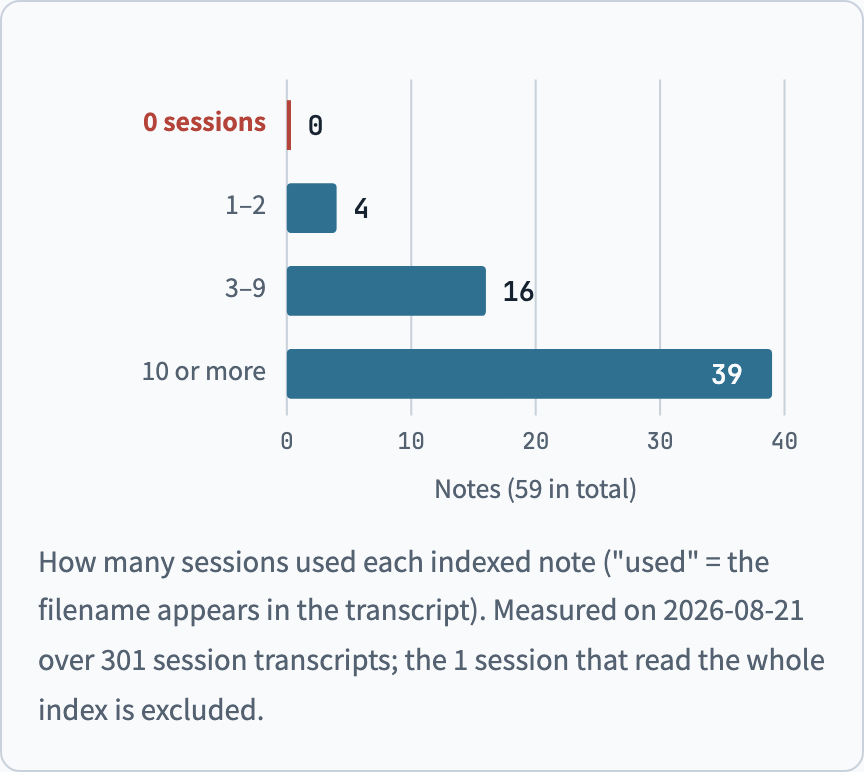
Figure 1. How many sessions used each indexed note (the note's filename appears in the transcript). Measured on 2026-08-21, from transcripts of 301 sessions; the 1 session that read the whole index has been excluded.
The more important finding: the iron rules that matter most are rarely looked up. They are iron rules exactly because the AI does not know it is making a mistake. On the day of the measurement there was an example. A note used by only 5 sessions stopped an error: treating a rule as surplus content and deleting it. Cutting iron rules by how often they are used is like removing your own brakes.
Lesson: Measure the denominator before you start.
Check: First ask how often this cost is paid, and how many times. When you see "used 0 times," two independent counts have to agree before it counts as a real 0.
Pitfall 6: "The conclusion another agent handed back is exactly what I thought"
In a work order we sent to a research agent, we wrote from memory that a company sat under a certain group, and asked it to "confirm the relationship with that group." Fortunately that sentence was a question. The research result reported no supporting evidence. The real lineage was another group.
If we had written it as a statement, the report would have contained a wrong passage with sources that looked reasonable. Every later document that cited it would have inherited the error.
Lesson: At handoff, an idea that has not been checked should be written as a question, not as a statement.
Check: At acceptance, compare against the original records, not against your own expectation. When the conclusion that comes back is exactly what you thought, that is when you go back and check the source.
Closing: a good memory system gets the AI to stop at the moment it should stop
Storing more is not the goal. Recalling it at the moment of the mistake is.
At the start of the year, we thought the goal of a memory system was "remember as much as possible." A year later, the six pitfalls share one point. In each of them the AI had something that "looked already checked": a tool report, a 0, a function that had tests, a negative sentence in memory, an intuition, or a report that matched the expectation.
Writing the trigger phrase as a symptom, holding the index to its budget, and keeping write discipline all serve one purpose: the right memory shows up at the moment the AI is about to trust those things.
Try it yourself
Ghost In Shell is open source under the MIT license. After you clone the repo, three commands create a workspace and check the knowledge notes:
git clone https://github.com/cyhsieh817/Ghost_In_Shell
cd Ghost_In_Shell
pip install -e .
gish init ./my-workspace
gish knowledge lint --workspace ./my-workspace
If you want the figures before the prose, we put the illustrated version in a separate piece: "Our Own AI Memory System: Ghost In Shell 5.2 Illustrated."