Why Does Your Kanban Always Force You to Choose Between "Useful" and "Good-Looking"?
One plain-text data layer, two brains each doing their own job.
I have a task board that's been running for over half a year. 39 active cards. Spanning R&D, grant proposals, client development, and papers. It started as an Obsidian Kanban Markdown file. Then I split it into structured card files. One .md per card. Frontmatter holds the status, owner, priority, and due date.
That decision felt great. Because it's plain text. So my Claude Code can read all 39 cards in one shot. Batch-update statuses. Move completed items to the archive. Any agent that can read files can touch it.
But one thing kept bugging me. It's ugly.
Looking at a task board in the terminal is like staring at a report's corpse. No columns. No color. Overdue items don't turn red. What I wanted was that "open it and see the big picture, click things with your mouse, updates reflected instantly" kind of war room. Here's the problem: pretty dashboards are usually locked inside some SaaS. Your data gets trapped in someone else's database. Switch tools and you can't take it with you. Programmable and good-looking: seems like you can only ever pick one.
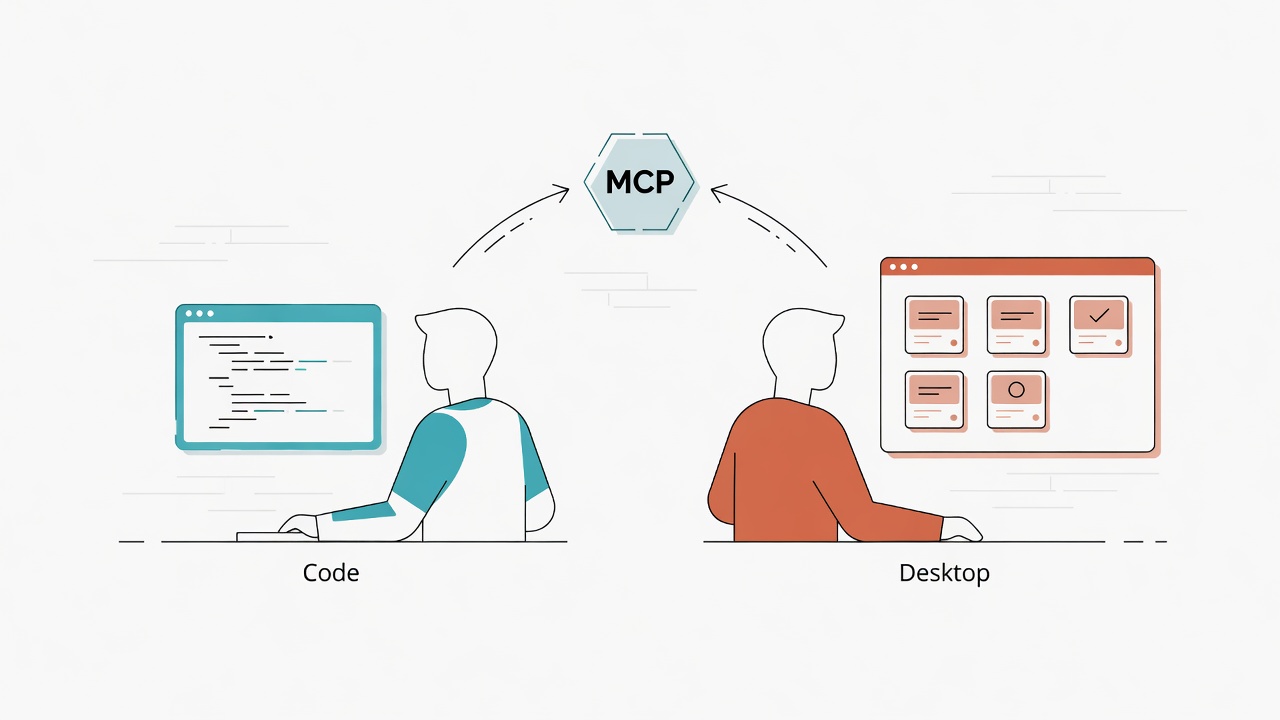
Until I split the two apart. Data stays data. Presentation stays presentation. MCP connects them in the middle. The result: the same board. Claude Code edits it programmatically in the terminal. Claude Desktop renders it in real-time through Live artifacts: beautiful, interactive. I can even click a card right on the dashboard, fill in progress, hit archive, and the underlying file gets changed. Both sides see the same source of truth.
This article walks through how to build this "dual-brain co-governance" setup. And it's not abstract architecture talk. I'll tear apart the actual Morning War Room I built, piece by piece.
Dual-Brain Kanban is a board architecture that completely separates the "data layer" from the "presentation layer." Data lives as plain-text cards, readable and writable by any AI Agent programmatically; presentation is rendered in real-time via Claude Desktop's Live artifacts, delivering both aesthetics and interactivity. MCP connectors bridge the two, letting both ends share the same data source.
First, the Finished Product: What a "Morning War Room" Looks Like
Four real-time data sources, one page, full picture.
Let me show you the destination first. The dashboard I built with Claude Desktop's Live artifacts looks like this when you open it:
- This Week's Sprint: Pulls cards with status "This Week" from the Kanban, sorted by urgency, overdue items change color.
- Today's Schedule: Fetches today's Google Calendar events with start/end times.
- Unread Emails: Grabs unread Gmail inbox messages, showing sender, subject, and snippet.
- Full Kanban Board: All cards, filterable by status x type in two dimensions. Each card has a checkmark in the upper right.
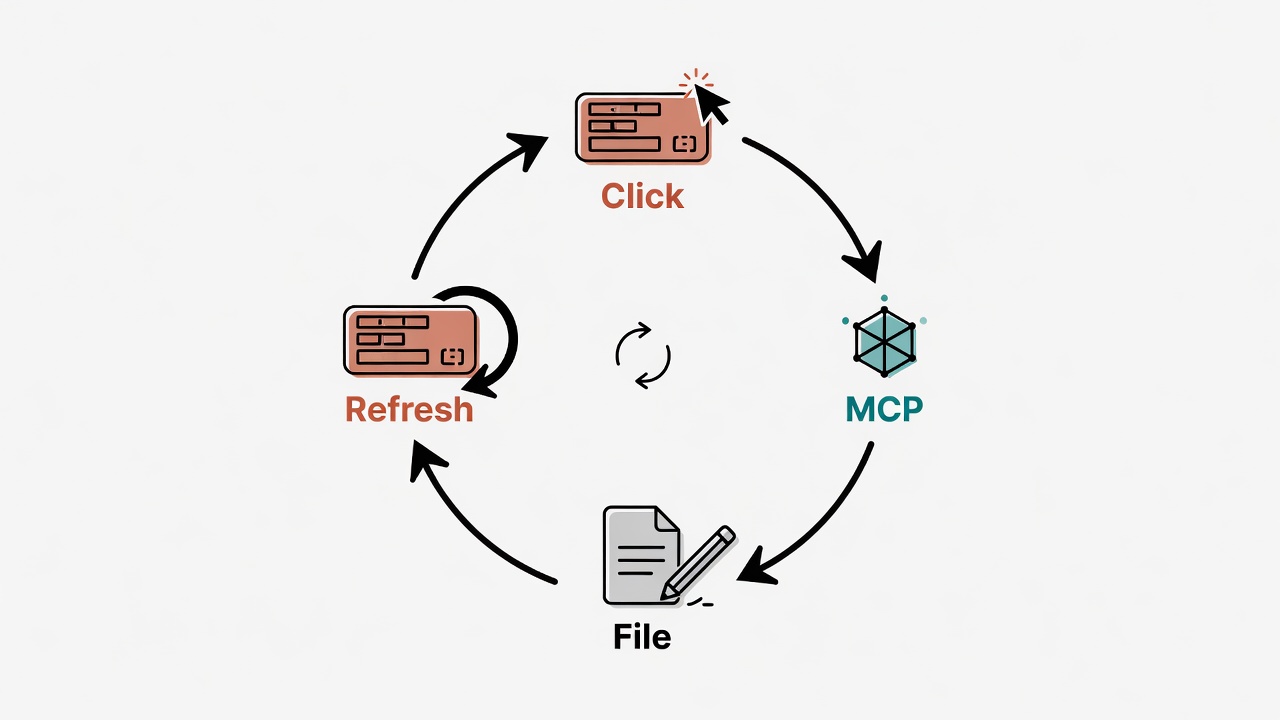
The key is that checkmark. Click it. A small modal pops up. You can fill in "Action taken," "Next step," "Adjust urgency." Hit confirm. The underlying .md card file actually changes. Or just hit "Archive." The card moves to the archive folder. The screen refreshes on the spot.
This dashboard feeds from three different connectors simultaneously. One is my local Kanban MCP. Two are cloud-based Google Calendar and Gmail. They coexist peacefully inside a single Live artifact. Let me break down how it all comes together.
Why Pretty SaaS Boards Are a Trap
It's not that they're ugly. It's that they hold you hostage.
You might be thinking: don't Trello, Notion, and Linear look great and work fine? Yes. But they all share one cost. Your data lives in their house.
Think of it as renting vs. buying land and building your own. Renting a SaaS board: nice interior, move right in. But you can't knock down walls or dig underground. One day you want your AI Agent to automatically organize tasks. Either it has an API (and you have to learn their API). Or it doesn't have one at all. Your 39 cards. Locked behind someone else's backend.
It gets worse with multiple agents. I've got more than one AI assistant now. Claude Code handles the heavy lifting. Sometimes I have other agents help out too. If the board data is locked in some SaaS, every new agent means rewriting the integration from scratch.
So what I want is clear:
- Data must be mine. Plain text. In my directory. Version-controllable.
- Any agent that can read files should be able to manage it directly. No proprietary API to learn.
- But the presentation needs to be beautiful, real-time, and interactive. Not a report corpse in the terminal.
These three seem to contradict each other. But once you layer them, they all hold true.
Three-Layer Architecture: Data, Bridge, Presentation
Each layer does one thing.
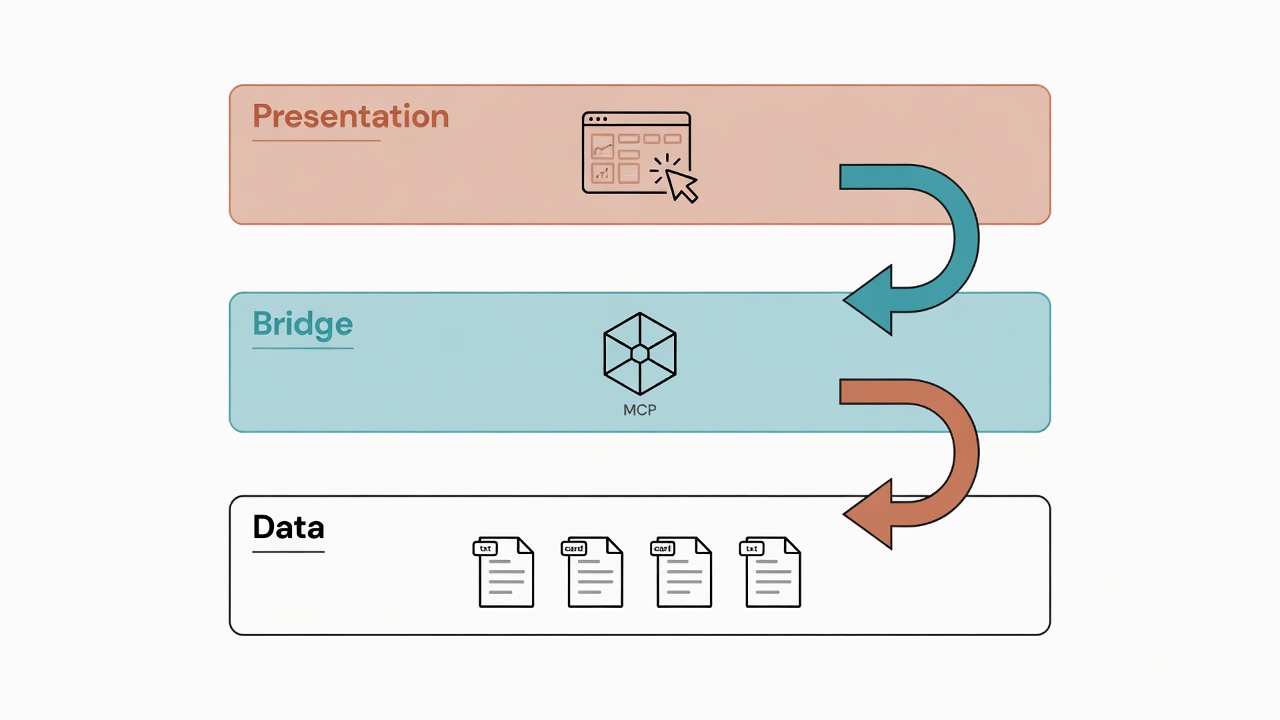
The whole system splits into three layers. Each with a single responsibility. Swap out any layer, and the other two stay unaffected.
Presentation   Claude Desktop / Live artifacts   (beautiful, real-time, interactive, write-back)
                 ↑↓  window.cowork.callMcpTool()
Bridge         MCP connectors                     (ycbio-kanban local + Calendar/Gmail cloud)
                 ↑↓
Data           cards/*.md + frontmatter            (plain text, version-controllable, any agent can read/write)
The critical insight: the data layer has zero knowledge of what the presentation layer looks like. It's just a bunch of Markdown cards. The presentation layer never touches the data's storage format either. It only gets current data through MCP, then renders. That middle MCP layer is the sole bridge. And this bridge is bidirectional. Data flows up for presentation, and commands flow down to modify files.
Let me unpack each layer.
Data Layer: Plain-Text Kanban, the Lingua Franca of Multiple Agents
One card per file, frontmatter as fields.
The data layer's core is humble. A cards/ folder. Under it, active/ (incomplete) and archive/ (completed, archived by quarter). Each card is a standalone .md. All fields live in YAML frontmatter:
---
id: 2026-Q2-icNAD-東南亞市場開發
title: icNAD+ 東南亞市場開發
status: 進行中
owner: CYH
urgency: high
due: 2026-06-30
next_step: 完成馬來西亞代理商初談
last_action: 2026-06-02 寄出產品白皮書
type: 業務開發
---

## 背景
東南亞 NAD+ 保健市場切入...
Why plain text? Because plain text is the greatest common denominator of all agents. Claude Code can read it. Codex can read it. Copilot can read it. Even you can edit it with a text editor. No proprietary format. No database lock-in. git diff shows every single change.
Then one crucial design: frozen enums. I have a schema.yml that hard-codes the legal values for fields like status, urgency, and type:
# schema.yml (excerpt)
status:   [待辦, 本週, 進行中, 卡關, 已完成]
urgency:  [low, medium, high, urgent]
type:     [研發, 業務開發, 計畫書, 論文, 平台, icNAD]
This step seems redundant. It's actually the lifeline of multi-agent collaboration. When multiple agents are all writing to this board: without frozen enums, Agent A writes status: 進行中. Agent B writes status: doing. Agent C writes status: 處理中. Three months later your board fields are a mess. Frozen enums are the shared dictionary everyone uses. All agents can only pick from the list. That's how the board doesn't get trashed.
The data layer's design philosophy in one sentence: Keep the data dumb: dumb data is universal data. Save the smarts for the layers above.
Bridge Layer: How MCP Connects: Two Approaches
Quick version vs. proper version, depends on whether you want guardrails.
The data layer is files. But Claude Desktop doesn't rummage through your hard drive on its own. You need a bridge in between. That bridge is the MCP (Model Context Protocol) connector. It lets AI read and write the local resources you specify.
Two ways to connect. One's fast, one's solid.
Approach 1: Generic filesystem MCP (30 seconds to set up)
Fastest route. Use the official filesystem server. Point it at your Kanban folder. Open ~/Library/Application Support/Claude/claude_desktop_config.json. Add this block:
{
  "mcpServers": {
    "workspace": {
      "command": "/Users/你/.local/bin/npx",
      "args": [
        "-y",
        "@modelcontextprotocol/server-filesystem",
        "/絕對路徑/到你的/Kanban"
      ]
    }
  }
}
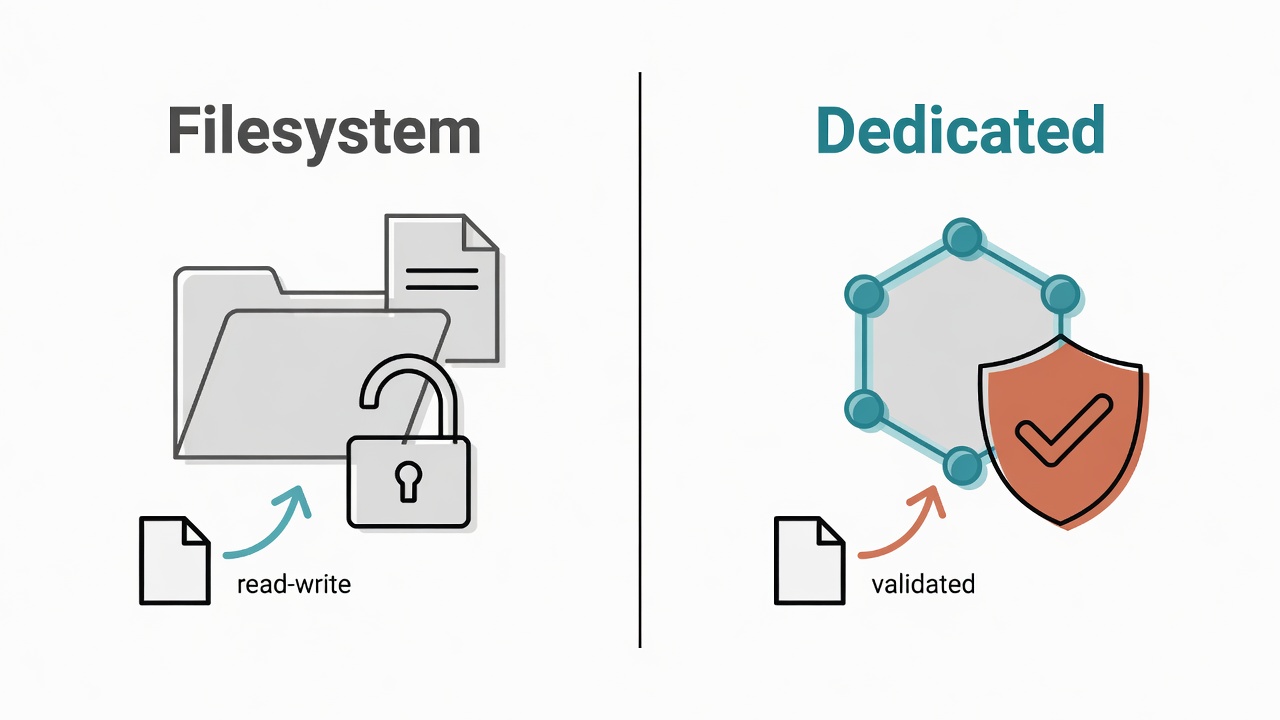
This gives you generic read/write. Can read any file. Can write any file. The upside is zero setup. The downside is it's dumb. It doesn't understand your schema. If the AI slips up and writes an invalid value for status, the filesystem MCP won't block it. It writes it through. Your frozen enums become decoration.
Quick heads-up: use an absolute path for
command. Claude Desktop launches MCP with a very clean PATH. If yournpxlives in a non-standard location (like~/.local/bin), writing just"npx"won't find it. Full path is the safest bet.
Approach 2: Dedicated Kanban MCP (the proper version, with guardrails)
A step up. Write an MCP server that understands Kanban. Mine is a small TypeScript server called ycbio-kanban. It doesn't expose arbitrary file writes. It only exposes six Kanban-specific tools:
| Tool | What it does |
|---|---|
kanban_list_cards |
List active cards, filterable by status / type / owner / urgency |
kanban_get_card |
Get full content of a single card |
kanban_update_card |
Update frontmatter fields (status, urgency, next_step, last_action...) |
kanban_create_card |
Create a new card with auto-generated id |
kanban_archive_card |
Move a completed card to archive/{year}-Q{quarter}/ |
kanban_get_schema |
Return the legal enum values from schema.yml |
Configuration looks like this (note it runs node on the compiled dist/):
{
  "mcpServers": {
    "ycbio-kanban": {
      "command": "node",
      "args": ["/絕對路徑/kanban-mcp-server/dist/index.js"],
      "env": {
        "KANBAN_ROOT": "/絕對路徑/到你的/Kanban"
      }
    }
  }
}
The difference? It turns the schema into program logic. kanban_update_card validates values before writing. kanban_get_schema lets the AI ask "what are the legal values for status?" at any time. Any agent modifying the board through this MCP is forced to stay on the rails. Garbage data can't get through. This is the same philosophy as the Hook Gatekeeper System: don't rely on AI self-discipline; rely on programmatic hard constraints.
How to choose between the two? See this table:
| Aspect | filesystem MCP | Dedicated Kanban MCP |
|---|---|---|
| Setup time | 30 seconds | Requires writing + building (about 1-2 hours) |
| Schema validation | ❌ None | ✅ Validates before writing |
| Tool semantics | Generic file read/write | Kanban-specific verbs |
| Best for | Personal quick testing | Multi-agent production collaboration |
| Risk of corrupted data | High | Low |
My recommendation: Start with filesystem MCP to get the pipeline working. Confirm that Live artifacts can actually render. Then spend an hour or two upgrading to a dedicated MCP. Don't dive into writing a server from the start. First verify the whole chain works end to end. My Morning War Room ultimately connects to the dedicated ycbio-kanban. Because it needs to write back from the UI. And write-back without schema validation? I'm not comfortable handing that to a front-end.
Presentation Layer: How Live Artifacts Actually Bind to Connectors
This is the "real-time and beautiful" piece of the puzzle, and the mechanism is very concrete.
The first two layers are the foundation. What actually makes your eyes light up is Claude Desktop's Live artifacts under Cowork mode. The official description:
Create dynamic artifacts that stay up-to-date using live data from your connectors.
In plain language: dynamic artifacts that keep themselves updated. The data source is your connector (i.e., MCP). A regular artifact is a dead snapshot: whatever it looked like when generated, that's what it stays. A Live artifact is alive. It's bound to your connector. When you re-fetch, it grabs the latest data and re-renders.
How does it know which connectors to bind? The answer is in a meta declaration block at the very top of the artifact file. My dashboard starts like this:
<script type="application/json" id="cowork-artifact-meta">
{
  "name": "Morning Dashboard",
  "mcpTools": [
    "mcp__ycbio-kanban__kanban_list_cards",
    "mcp__ycbio-kanban__kanban_update_card",
    "mcp__ycbio-kanban__kanban_archive_card",
    "mcp__b331c650-...__list_events",
    "mcp__31baa064-...__search_threads"
  ],
  "mcpServerNames": ["ycbio-kanban", "ycbio-kanban", "ycbio-kanban",
                     "Google Calendar", "Gmail"]
}
</script>
Understand this block, and you understand the core of Live artifacts. It explicitly declares "I need these MCP tools." Local stdio servers (ycbio-kanban) get friendly names. Cloud connectors (Calendar, Gmail) use UUID strings. Three different sources, side by side. One dashboard covers them all.
The Line That Actually Fetches Data: window.cowork.callMcpTool
Once tools are declared, how do you actually get data? Inside the Live artifact's JavaScript, you call through the bridge injected by the Cowork runtime:
// Fetch Kanban cards
const raw  = await window.cowork.callMcpTool(
  'mcp__ycbio-kanban__kanban_list_cards', { limit: 100 }
);

// Fetch today's calendar
const cal  = await window.cowork.callMcpTool(
  'mcp__b331c650-...__list_events',
  { startTime: start, endTime: end, timeZone: 'Asia/Taipei' }
);

// Fetch unread Gmail
const mail = await window.cowork.callMcpTool(
  'mcp__31baa064-...__search_threads',
  { query: 'is:unread in:inbox', pageSize: 8 }
);
That's how straightforward it is. window.cowork.callMcpTool(toolName, params). Returns data. Then you render however you want. Columns, color-coding, stats: all your HTML/CSS freedom.
A Real Gotcha: Return Values Come in Three Shapes
Nobody tells you this upfront. The return from callMcpTool can be one of three shapes, depending on the tool. After getting burned, I wrote a safety fuse:
function extractMcpResult(raw) {
  if (typeof raw === 'string') return JSON.parse(raw);            // (a) plain string
  if (raw?.structuredContent !== undefined)                       // (b) structured result
    return raw.structuredContent;
  if (Array.isArray(raw?.content) && raw.content[0]?.text)        // (c) full MCP envelope
    return JSON.parse(raw.content[0].text);
  return raw ?? {};
}
If you're building a Live artifact with MCP, just copy this function. Saves you half an hour.
Interaction Is Not Read-Only: Editing and Archiving Cards Straight from the Dashboard
This is where the presentation layer shows its real power in "co-governance."
Many people assume a dashboard is just for looking. Wrong. Because callMcpTool doesn't only call read tools. It can call write tools too. That checkmark on the upper-right of each card in my dashboard triggers this:
// Update card progress
async function submitUpdate() {
  const payload = { id: activeCard.id };
  if (action)  payload.last_action = action;
  if (nextVal) payload.next_step   = nextVal;
  if (urgency) payload.urgency     = urgency;

  await window.cowork.callMcpTool('mcp__ycbio-kanban__kanban_update_card', payload);
  await loadKanban();   // Re-fetch immediately after write, screen refreshes on the spot
}

// Archive a completed card
async function confirmDone() {
  await window.cowork.callMcpTool('mcp__ycbio-kanban__kanban_archive_card',
    { id: activeCard.id });
  await loadKanban();
}
The flow is a closed loop. The UI writes back via MCP. MCP modifies the .md. After modification, re-fetch. Screen updates. You type "sent the quote today" in the dashboard, change the next step to "waiting for their reply." Hit confirm. The underlying card's frontmatter actually changes. And because it goes through the dedicated MCP, urgency only accepts legal values. The UI uses a dropdown to enforce it. Garbage can't get through.
This is why I insist the presentation layer connects to the dedicated Kanban MCP, not the filesystem MCP. For reading, filesystem works fine. But for writing, I need schema guarding the gate.
Security Red Line: Don't Shove Connector Data Straight into innerHTML
I stepped on this one myself and almost got burned.
Let me tell you about a real vulnerability that a security scan caught while I was building this dashboard. It's subtle. But dangerous.
The dashboard needs to show unread emails. My first version looked like this:
// ❌ Dangerous approach
body.innerHTML = threads.map(t => {
  const m = t.messages[0];
  return `<div class="email-subject">${m.subject}</div>
          <div class="email-snippet">${m.snippet}</div>`;
}).join('');
Looks fine, right? Big problem. m.subject is the email subject line. Who decides what's in the subject? The person who sent the email. Anyone can send you an email with a subject like <img src=x onerror="steal your data here">. You open your dashboard in the morning. That HTML gets parsed and executed by innerHTML. And this screen has active connections to your Gmail, Calendar, and Kanban. Get hit, and you've just handed over the keys.
This is XSS (Cross-Site Scripting). All connector data pulled by a Live artifact (email subjects, senders, snippets, calendar titles) is external, uncontrollable input. Shoving it into innerHTML is rolling out the welcome mat for attackers.
The fix is simple. One escape helper. All external data goes through it before hitting the screen:
// ✅ Safe approach
function esc(s) {
return String(s ?? '').replace(/[&<>"']/g, c => ({
'&':'&','<':'<','>':'>','"':'"',"'":'''
}[c]));
}
body.innerHTML = threads.map(t => {
const m = t.messages[0];
return `<div class="email-subject">${esc(m.subject)}</div>
<div class="email-snippet">${esc(m.snippet)}</div>`;
}).join('');
esc() converts dangerous characters like < > " into harmless HTML entities. <img> just shows up as plain text. It doesn't execute.
Remember this iron rule: any data from a connector (especially email and calendar, things outsiders can write to) must go through esc() before entering innerHTML. Or just use .textContent and skip string concatenation entirely.
One more insidious point: Live artifacts are AI-generated. Next time you ask it to rebuild the dashboard, it'll very likely spit out an unescaped version, resurrecting the vulnerability. The real fix: when regenerating, explicitly state in your prompt "all connector data must be HTML-escaped before entering innerHTML." Bake the security requirement into the generation instructions.
Co-Governance Division of Labor: Who Executes, Who Enforces, Who Displays
Three roles, one source of truth.
The essence of "dual-brain co-governance" is letting different brains do what they're best at. But all working against the same data.
| Role | Tool | Responsibility | Analogy |
|---|---|---|---|
| Operator | Claude Code (terminal) | Batch card updates, migrations, running scripts, git version control, writing MCP servers | Backstage foreman |
| Helpers | Other agents (Codex / Copilot...) | Read/write the same cards in their own contexts | Shift workers |
| Gatekeeper | Dedicated Kanban MCP | Force all writes to be valid | Quality control |
| War Room | Claude Desktop Live artifacts | Real-time full-picture display, with UI write-back | Display window + control panel |
A typical day flows like this. Morning, I open the Morning War Room. Which cards turned color for being overdue. What's on the schedule today. Any emails that need urgent replies. One page, full scan. A card needs a progress update. Click the checkmark right on the dashboard. Type two sentences. Hit confirm. The underlying card is updated. Need something bigger? Switch to Claude Code. Tell it "mark these five proposal-related cards as in-progress, add a next_step to each." It batch-updates. Commits. I go back to the dashboard. Hit refresh. Everything reflects the latest state.
Heavy changes go to the left brain (Claude Code: precise, programmable, batch). Viewing and lightweight edits go to the right brain (Claude Desktop: intuitive, beautiful, clickable). MCP syncs them in between. Both sides always see the same truth. No copy-pasting. No two copies drifting out of sync.
And because the data layer is neutral plain text, if I ever want to swap out one of the brains, the data layer stays untouched. Just plug in a different file-reading agent. The presentation layer and operation layer are both replaceable. The data layer is the anchor.
Building from Scratch: 5 Steps, One Afternoon
Follow the order. Don't skip ahead.
Step 1: Design the Data Layer (about 30 minutes)
Create cards/active/ and cards/archive/. Decide on the frontmatter fields for each card. Write a schema.yml to freeze the enum values for status, urgency, type, etc. Manually create three to five real cards first. Make sure the fields are sufficient.
Step 2: Connect filesystem MCP to Validate the Pipeline (about 5 minutes)
Add the official filesystem server to claude_desktop_config.json. Point it at your Kanban root directory. Remember to use absolute paths. Fully quit Claude Desktop (Cmd+Q, not just closing the window). Relaunch.
Step 3: Verify Live Artifacts Can Read (about 10 minutes)
Enter Cowork. Live artifacts tab. New artifact. Confirm your connector shows up in the connector list. Ask it to generate a Kanban board. This step is the litmus test. If you see a beautiful real-time board, the whole chain is working.
Step 4: Upgrade to a Dedicated Kanban MCP (about 1-2 hours)
Once the pipeline works, write the dedicated server. Implement the six Kanban verbs. The key point: kanban_update_card must validate against the schema before writing. Build to dist/. Swap the config from filesystem to this node server. Restart. This step buys you "safe write-back from the UI."
Step 5: Build an Interactive War Room (about 30 minutes)
Have the Live artifact connect to kanban_update_card and kanban_archive_card. Add a small modal for "update progress / archive." Remember to remind it that all connector data needs esc() escaping. Done. While you're at it, point any other agents you want at the same cards folder.
Common Pitfalls
6 of them: know them now, dodge them later.
Pitfall 1: Live artifacts only exist in Cowork mode. You won't find them in the regular Chat tab. They're in Cowork's sidebar. Remember to switch over first.
Pitfall 2: Local stdio MCP not showing up in the connector list. The connector sources for Live artifacts: cloud accounts (Gmail, Calendar) always show up. Whether local stdio MCPs get listed: you must verify this with your own eyes in Step 3. If it's not listed, you're stuck at "can read but can't render in real-time."
Pitfall 3: Connector data going straight into innerHTML (XSS). Covered extensively above. Email subjects and calendar titles are attacker-controllable. Always esc(). This is a pitfall that can cause real damage.
Pitfall 4: callMcpTool returns in three shapes. Plain string, structuredContent, content[].text envelope. Use the extractMcpResult function from earlier to normalize them. Otherwise you'll be stuck on "there's clearly data but parsing keeps failing."
Pitfall 5: filesystem MCP corrupts frontmatter. Generic read/write has no schema validation. If you need write-back, upgrade to the dedicated MCP. The sooner the better.
Pitfall 6: Data folder on iCloud, multi-device sync delay. If cards live on an iCloud path, after Device A makes changes, Device B's Live artifact might not have synced yet. Don't panic when you see stale data. Wait for iCloud to finish syncing, then re-fetch.
Want to Go Deeper?
This "separate data from presentation" philosophy is really a microcosm of the entire Agent workflow design. To see how memory, Skills, and Hooks come together using the same layered thinking, start with CLAUDE.md Design Philosophy. Then Three-Layer Memory Architecture and Cross-Platform Memory Sync. Once you connect the dots, you'll understand why "keeping the bottom layer dumb" actually makes the entire system stronger.
I've also put together a Claude Code Quick-Start Cheat Sheet. Installation, CLAUDE.md configuration, memory system basics, MCP setup, common commands: all on one page.
Download the Cheat Sheet for Free
Next up: Turning the Kanban into a True Real-Time Dashboard: Local File Watcher Implementation