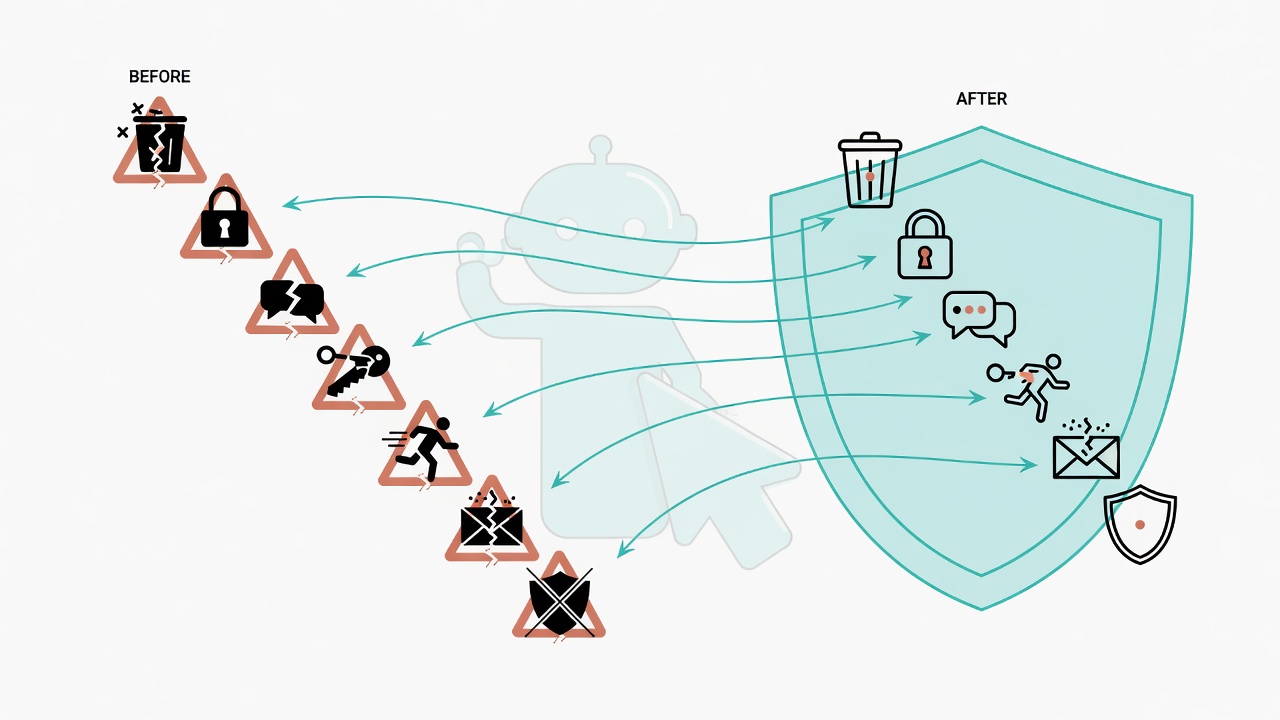
Every rule exists because something went wrong
For developers, an AI Agent's safety guardrails are system immunity bought with real mistakes.
Ever thought about this? Every instruction you hand to an AI is like giving a loaded gun to an intern who moves fast but has zero common sense. Execution: 100 points. Judgment: 0 points. Over six months, my AI Agent deleted critical files, leaked an API Key, and forgot three days of architecture discussions like they never happened. 7 catastrophic wrecks, each one making me want to smash my monitor. You know what's the most ironic part? That safety rule checklist in my system now? Not a single rule was something I "thought of in advance." Every one of them is a patch paid for in blood and tears. 100% of them.
AI Agent pitfall defenses are a systematized set of rules distilled from real failures, covering safety guardrails, memory persistence, SOP routing, and cross-platform sync, designed to prevent destructive errors during AI automation.
Over the past six months, I built an Agent workflow on Claude Code that handles literature management, code development, document writing, and statistical analysis daily. The deeper I went, the more painful the mistakes got. Here are the seven that cost the most. Each one is a red line earned only after burning real time.
Mistake 1: Got burned by an AI-written rm -rf
One rm -rf cost me 2 hours recovering files from backup. The soft-delete rule was born.
What happened
I asked the AI to clean up some temp files. It "helpfully" wrote a cleanup script with rm -rf. Like asking a new janitor to sweep the office, and he doesn't just sweep the floor, he also tosses your contracts and USB drives into the garbage truck. I was in a rush, glanced at it, thought it looked fine, and let it run. The result? An important config directory got caught in the blast.
Burned a solid 2 hours pulling files from Time Machine backup. No backup? Then it's just gone. rm -rf is basically a one-click nuke button. Dead silent the moment you press it, and you only discover the fallout when you look back. And the AI won't pause to glance at you and ask "are you sure?" before pressing it. It just presses it. That's it. Clean and decisive.
From that day on, I added an ironclad rule: rm is completely banned, use mv file _DELETE_file instead. The file just gets renamed. You leave yourself an exit. Like putting a transparent bottom on the trash can: you can still see what's in there and fish it out. Once you're sure it's truly garbage, delete it manually.
This became the first interception rule added to the Hook Gatekeeper System.
Mistake 2: No gatekeeper, and the AI modified files it shouldn't have
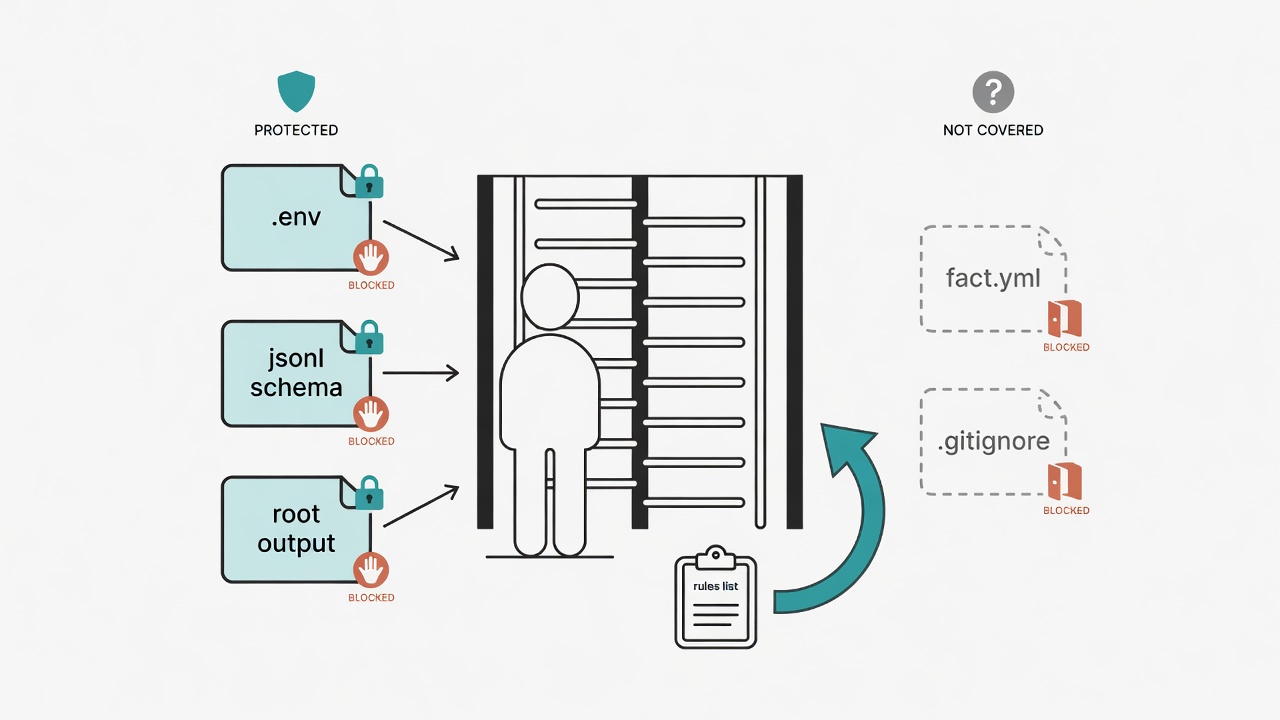
A PreToolUse Hook gatekeeper mechanism intercepts sensitive file modifications before the AI writes.
What happened
I asked the AI to modify a feature module. On its own, it decided to "also" tweak the environment config file. Problem is, that config file controls path settings for the entire system. Like the main circuit breaker in a building. You just asked the electrician to change a light bulb, and he "helpfully" messed with the distribution panel. After that, everything broke.
Took over an hour of debugging to find the root cause. The most insidious part? The lines the AI changed looked completely reasonable, mixed in with the normal modifications. At first glance, you'd never guess it made those changes. This isn't carelessness. It's the "looks correct but is actually lethal" kind of mistake. Like invisible glass shards mixed into food. The surface looks perfectly fine.
After that, I built a PreToolUse Hook: before the AI writes to any file, the gatekeeper script checks whether the target is on the "do not touch" list. If it is, red light. Warning or outright block. No matter how enthusiastic the AI gets, it has to pass this checkpoint first.
My current sensitive file list includes:
| File Type | Examples | Protection Level |
|---|---|---|
| Environment config | .env, config files |
Block, requires manual confirmation |
| Memory files | fact.yml, episodic.jsonl |
Warning |
| System core | CLAUDE.md, AGENTS.md |
Warning |
| Git config | .gitignore, .gitmodules |
Block |
For the full Hook design, see Hook Gatekeeper System: Every Line of Code Your AI Writes Goes Through QA.
Mistake 3: Total context loss across sessions
The three-layer memory architecture lets the AI retain decision context across sessions, saving roughly 3 hours of repeated explanations per week.
One day I spent two hours discussing architecture decisions with the AI. Settled on a technical direction and implementation details. Next day, opened a new session to continue. The result? It remembered nothing. Explained everything from scratch. Third day? Same story. Like having a colleague you met with three days in a row, and every morning they walk in with a brand new brain. Everything from the past two days has evaporated.
Every re-explanation burned 20 minutes, accumulating to over 3x normal time expenditure per week. Worse, the AI occasionally made decisions that contradicted the previous day's, because it had no idea what was decided before. You say go east, it agreed yesterday, but today it marches west and confidently explains why west is better. This "amnesia-driven derailment" adds up to more wasted time per week than writing new features.
I built the three-layer memory architecture, giving the AI the equivalent of short-term, medium-term, and long-term notebooks:
- fact.yml: Stores long-term stable facts and preferences. Like sticky notes on the edge of your monitor that are always there
- episodic.jsonl: Stores every important decision and lesson learned. Like an engineering journal you can flip open to review why something was decided that way
- scratchpad.md: Stores current task progress and scratch notes. The draft paper on your desk that gets replaced when done
Now every new session, the AI automatically reads all three layers and picks up where things left off. Architecture decisions no longer get lost.
Mistake 4: Typing the same instructions N times over
The Skill routing engine compressed repeated instructions from 10 minutes each time to a 3-second trigger.
Writing popular science articles has a fixed workflow: outline, section-by-section drafting, de-AI-ifying, formatting. Every time I started a new article, I had to re-explain the entire process. Over a few months, I must have pasted "help me write a popsci article using this format, first make an outline, then..." more than 50 times.
Pure time burn. And every time I manually gave instructions, subtle detail differences crept in, and article quality drifted. Time gets eaten away bit by bit. It's like going to the same breakfast shop every day and having to explain from scratch: "egg crepe not too crispy, less soy sauce, half-sugar iced tea." The owner never remembers, and sometimes throws in mayo for good measure.
I eventually built a Skill routing engine. Each repetitive workflow gets packaged into an SOP with trigger words. Now typing "write popsci" triggers the entire workflow automatically: format, steps, quality checklist, everything. From ten minutes explaining the process each time to a three-second trigger. Like setting your regular order as "the usual." One phrase, done. No need to recite the menu item by item.
For the detailed Skill routing design, see Skill Routing Engine: Making AI Automatically Pick the Right Workflow.
Mistake 5: Multi-platform memory out of sync
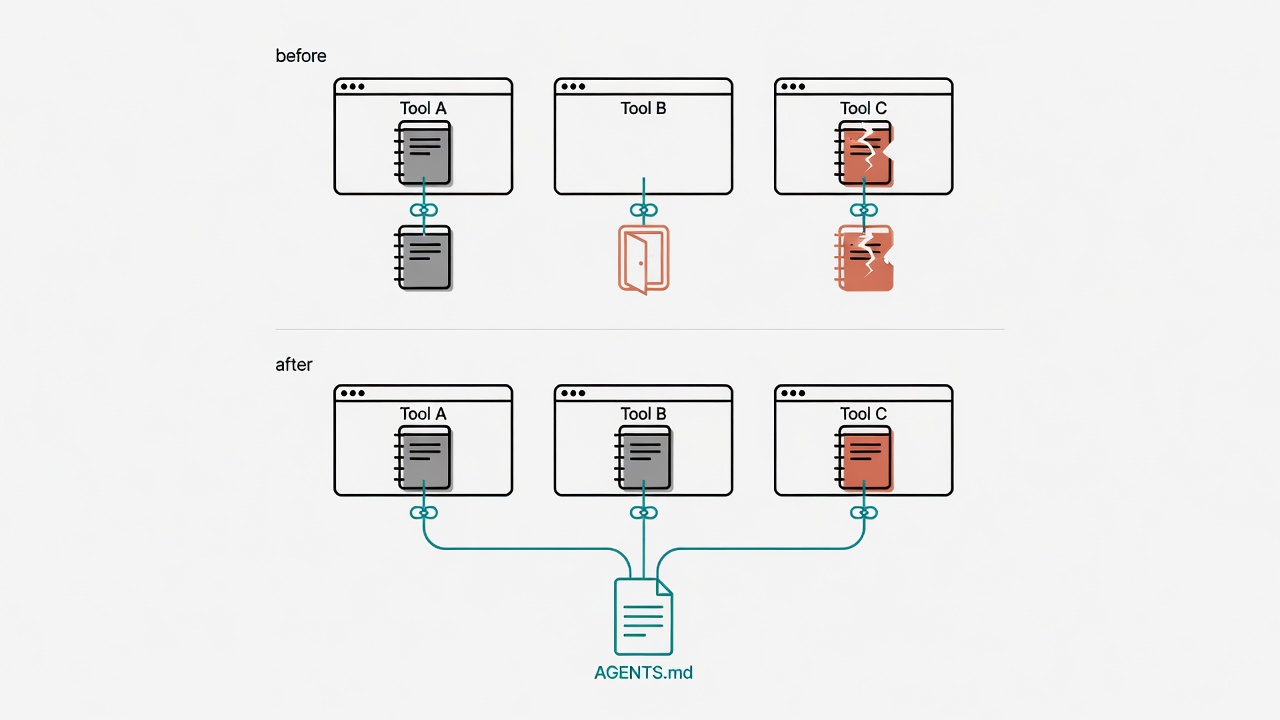
The AGENTS.md cross-platform injection mechanism lets 3 different tools share the same safety rules.
I use Claude Code, Copilot CLI, and Gemini CLI simultaneously. In Claude Code, I had "Traditional Chinese," "rm banned," "use R for statistics" all set up. But in Copilot CLI? None of those rules existed. One time using Copilot, the AI spit out Simplified Chinese and almost ran an rm command.
Wrecked. Safety habits trained in Tool A go straight to zero in Tool B. Like installing a full security system at home but leaving the office front door wide open. A thief won't hit your strongest defense. They'll pick the window you forgot to lock. In a multi-platform environment, the most dangerous thing isn't a vulnerability in one platform. It's your assumption that "the other side has guardrails too" when it actually doesn't. Once rules escape one platform's jurisdiction, consequences are just a matter of time.
I built the AGENTS.md cross-platform injection mechanism. Shared rules live in a single AGENTS.md, injected into each platform's config via @import or sync scripts. One source of truth, referenced everywhere. Like putting the same lock on every door: when you change the key, all doors change together.
For the full multi-platform sync playbook, see Cross-Platform Sync: One Memory Across Claude/Copilot/Gemini.
Mistake 6: API Key nearly got committed to git
Environment variables plus three layers of defense push API Key leak risk close to zero.
I asked the AI to write a script integrating an external service. It hardcoded the API Key directly into the source code. That's putting your house key in the front door lock and taping a note to it saying "this is my house." I didn't look carefully and committed it. Private repo? Doesn't matter. A security principle is a security principle. You don't leave your house key on the ground just because "the building has a doorman."
Immediately after discovering it: revoked the old key, regenerated a new one, cleaned history with git filter-branch. Total time: 40 minutes, plus constantly checking whether the old key had been abused. Those forty minutes of anxiety were more exhausting than writing code. You stare at the API usage dashboard watching every number, thinking "has someone already burned through thousands of requests on my key." That cold sweat is ten times worse than debugging.
Current defenses: API Keys must never be hardcoded, always use environment variables. .gitignore includes .env, *.key, credentials.json. On top of that, a pre-commit hook scans for suspected key strings. Rules written in both CLAUDE.md and AGENTS.md, readable by all platforms. Three checkpoints. Like a lock, a deadbolt, and a security camera: miss one, two more remain.
Mistake 7: Processes named bare python3, couldn't tell which script was running
Proper full-path naming rules turned process identification from a 30-minute detective debug session into a glance.
I had the AI run several background tasks, all launched with bare python3. One day the system noticeably slowed down. Checked ps aux: four python3 processes. Which is which? No idea. Like having four people in your living room all wearing identical masks. You know someone ate the pudding from the fridge, but you can't tell who.
Had to use lsof on each process to check what files it had open. Took forever to barely figure it out. Eventually just killed them all and restarted. This "detective-style debugging" takes 15 to 30 minutes every time. Not exaggerating. And as more automated tasks pile up, there are only more masked figures, and the scene only gets more chaotic.
New rule: Background tasks must not use bare python3, node, or bash. Must include the full script path. python3 script.py is not acceptable; it must be python3 scripts/lit_pipeline.py. Background tasks also need descriptive labels. Like every worker entering a construction site wearing a name badge and a distinct colored vest: one look and you know who's responsible for what.
Small thing? Wait until you've got a dozen automation tasks running simultaneously.
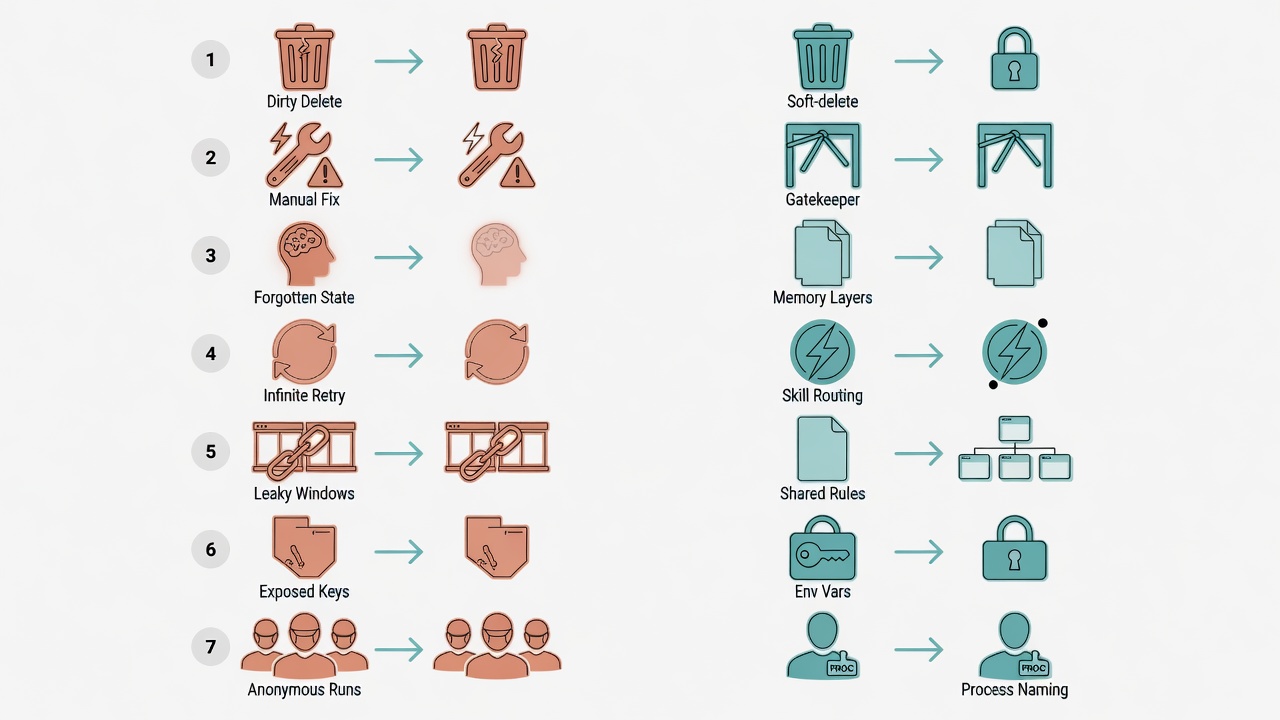
Seven Lessons, One-Line Summary
7 defense lines cover the most common categories of destructive risk in AI Agent automation.
| # | Mistake | Defense | System Module |
|---|---|---|---|
| 1 | rm -rf deleted wrong files | Soft-delete rule | Hook gatekeeper |
| 2 | Modified files that shouldn't be touched | Sensitive file interception | Hook gatekeeper |
| 3 | Cross-session amnesia | Three-layer memory writes | Memory architecture |
| 4 | Repeating the same instruction | SOP trigger routing | Skill routing |
| 5 | Multi-platform rules out of sync | AGENTS.md injection | Cross-platform sync |
| 6 | API Key leaked | Env variables + gitignore | Security policy |
| 7 | Processes named with bare generic commands | Full-path naming convention | Security policy |
Every one of these defense lines is simple enough that you'd think: "Do we really need a rule for that?"
Yes.
Because when things go wrong, you're always in a rush, always thinking about three other things at once, always feeling like "it won't be a problem this time." And then it's a problem. That said, defenses have limits: they catch known mistakes, but they can't stop novel ones you've never imagined. Defenses aren't for when you're alert and focused. They're for when it's 2 AM and your brain is half asleep. Like seatbelts: not for when you're sharp, but for the moment you didn't see coming.
If you want to see how these defenses wire together in a complete system, check out Building a Complete Agent Workflow from Scratch (Part 2): Deployment. It has the full seven-step build process from start to finish.
Want to go deeper?
I've put together a "Claude Code Quick Start Cheatsheet" covering installation, CLAUDE.md configuration, memory system basics, and common commands, all on one page. It also includes a quick-reference version of these seven safety rules.