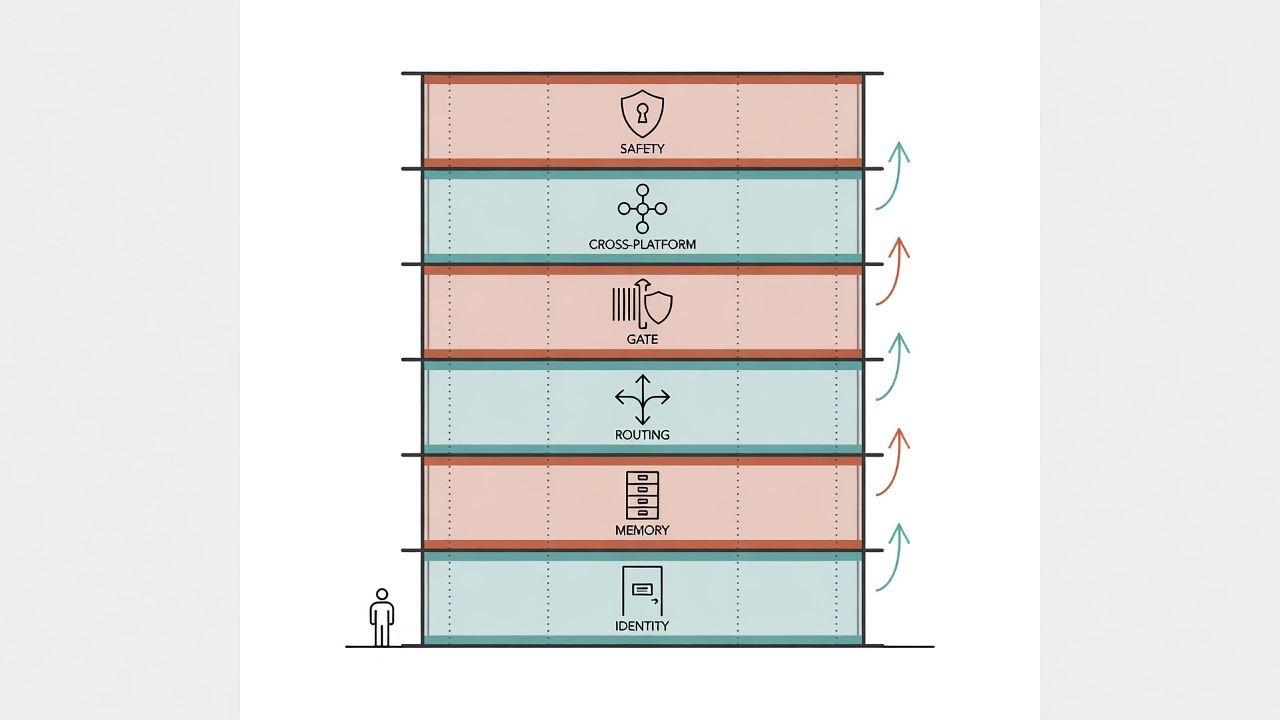
It's Not About Stacking Features. It's About Building a System.
Treating AI as a system rather than a conversation tool creates a tenfold efficiency gap.
Here's something I tracked: over six months, I averaged 3.2 times per day re-explaining "who I am" to AI, each time taking 2 minutes. Annoying. Over half a year, just "self-introductions" burned through more than 16 hours. Ever thought about it? It's like showing up to the office every day and your coworkers have all lost their memory. You have to re-state your name, where you sit, what project you're on.
You might be using AI Agent the same way: hit a problem, open a chat, toss in instructions, grab the result, close. Next time you open it, you're explaining who you are and what you need all over again. Every session feels like a first date. It really is that exhausting.
After six months of working with Claude Code, I've boiled down my biggest takeaway to one thing: treating AI as a "conversation tool" wastes 90% of its capability. It's like buying a whole building and only using the lobby for meetings. You've never even taken the elevator, let alone visited the offices, file rooms, or security systems upstairs. Treat it as a configurable system instead? The efficiency gap isn't something percentages can capture.
An AI Agent architecture blueprint is a layered system framework that decomposes AI Agent behavior into six independent layers: identity, memory, routing, gating, cross-platform, and safety. Each layer has a clear responsibility while interconnecting with the others, evolving an AI Agent from a "one-shot tool" into "an accumulating, extensible, trustworthy work partner."
This is Part 1 of "Building a Complete Agent Workflow from Scratch," focused on architecture design. Part 2 (T10) covers hands-on deployment. Let me be upfront: this architecture wasn't sketched on a whiteboard. It supports my daily work spanning research, development, and teaching. It runs every day and has been running for six months.
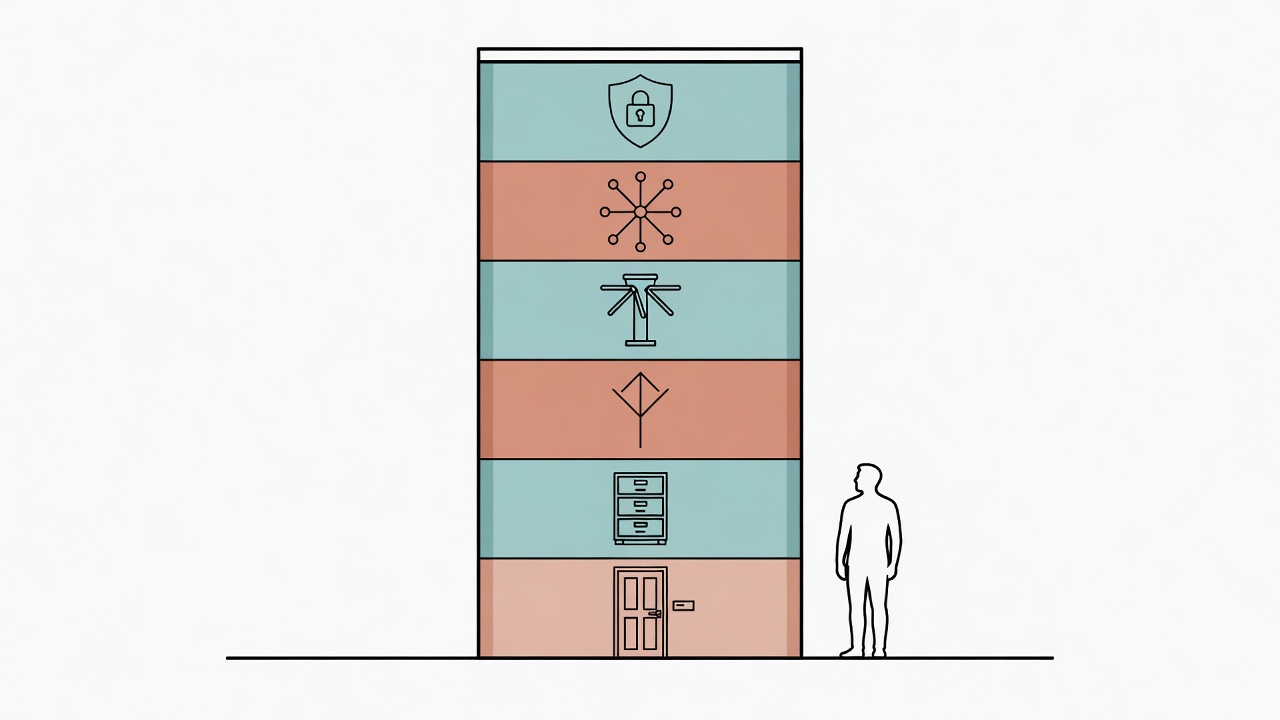
The Six-Layer Architecture at a Glance
From bottom to top: identity, memory, routing, gating, cross-platform, safety.
Imagine you're building a skyscraper. Foundation first, then the structural frame. Frame has to be solid before you run plumbing and wiring. Plumbing done, then interior finishing. Finishing done, then the security system. Last comes the external connections so branch offices can use the same management system. The six-layer AI Agent architecture follows the exact same logic.
Let's zoom out for the full picture first. Details come layer by layer afterward:
┌─────────────────────────────────────────────────┐
│                   User (Human)                   │
├─────────────────────────────────────────────────┤
│  Layer 6: Safety Layer                           │
│  ── 10 baseline rules + sanctum protection ──    │
├─────────────────────────────────────────────────┤
│  Layer 5: Cross-Platform Layer                   │
│  ── @import mechanism + memory injection ──      │
├─────────────────────────────────────────────────┤
│  Layer 4: Gate Layer                             │
│  ── Hook system + quality interception ──        │
├─────────────────────────────────────────────────┤
│  Layer 3: Routing Layer                          │
│  ── Skill / SOP auto-dispatch ──                 │
├─────────────────────────────────────────────────┤
│  Layer 2: Memory Layer                           │
│  ── Three-tier memory architecture ──            │
├─────────────────────────────────────────────────┤
│  Layer 1: Identity Layer                         │
│  ── CLAUDE.md / AGENTS.md / BOOT.md ──           │
└─────────────────────────────────────────────────┘
Each layer has a clear responsibility. Upper layers depend on lower layers, but never skip layers. The routing layer reads data from the memory layer to decide dispatch targets. The gate layer reads rules from the safety layer to determine interception criteria. The biggest benefit of layering? Just like renovating a building's interior without touching the frame, you can modify one layer while all others stay untouched. Last week I refactored the entire memory layer's file format. Zero impact on routing and safety. Literally.
Layer 1: Identity Layer -- The Building's Nameplate and Foundation
The identity layer answers three fundamental questions: whose assistant are you, what are the behavioral rules, and what does the working environment look like.
The identity layer is the building's nameplate. When a visitor walks up to the entrance, the first thing they see is what this place is called, what it does, and who runs it. The identity layer answers three questions: Whose assistant are you? What are the behavioral rules? What does the working environment look like?
In Claude Code, these three questions split into three files:
| File | Responsibility | Analogy |
|---|---|---|
CLAUDE.md |
Project-level entry config, defines how the AI behaves in this project | Employee handbook |
AGENTS.md |
Defines the AI's role, skills, language rules, collaboration norms | Job description |
BOOT.md |
Core paths, identity, and connection info loaded at startup | Boot config |
Without an identity layer, every AI Agent conversation starts from a blank page. "I use Traditional Chinese (Taiwan)." Said it. "My project is at this path." Said it again. "Statistics should default to R, not Python." Third time now. Time just leaks away. Every morning you spend five minutes on self-introductions, and sometimes you still miss something.
The identity layer takes these "always-true premises" and solidifies them into files. Auto-loaded when the AI starts. You don't re-introduce yourself at the office every day. Your AI shouldn't have to either.
The identity layer is the starting point for everything: memory layer "preferences" derive from identity layer definitions. The routing layer's Skill index lives in the identity layer. Safety rules have their own layer but get referenced from the identity layer. CLAUDE.md typically uses @import to pull in other config files, forming a configuration tree.
# CLAUDE.md example structure
@import AGENTS.md        # Roles and norms
@import BOOT.md          # Boot paths
# After the identity layer loads, the AI knows where it is, who it works for, and what to follow
Design principle: Identity layer content should change infrequently. If you find yourself editing the identity layer often, some of that content probably belongs in the memory layer or routing layer instead.
Layer 2: Memory Layer -- The Building's File Room
The three-tier memory architecture divides AI knowledge into fact, episodic, and scratch layers.
The memory layer is the building's file room. Contracts go in the safe, meeting notes in the filing cabinet, sticky notes on the current desk. Without this file room? The AI has the memory of a goldfish. Every seven seconds, it meets you for the first time again.
The three-tier memory architecture is a design pattern that divides an AI Agent's persistent knowledge into three levels: fact memory, episodic memory, and scratchpad memory, each with different read/write frequency, lifecycle, and purpose.
| Memory Tier | Content | Lifecycle | Read/Write Frequency |
|---|---|---|---|
| Fact memory | User preferences, tool settings, project index | Long-term stable | Read-heavy, rarely written |
| Episodic memory | Past decisions, failures, milestones | Continuously accumulated | Append-only, occasionally read |
| Scratchpad memory | Current task notes, intermediate state | Expires when task ends | Frequent read/write |
Here's something that actually happened to me. Last week I spent 40 minutes with the AI analyzing three options for a technical decision, ultimately choosing Option A. This week, continuing development, I mention the same feature. The AI re-analyzes from scratch and this time recommends Option B. Why? Because it has zero memory of last week's decision. 40 minutes wasted.
With a memory layer, things are different. Three tiers each handle their own scope:
- Fact memory records "this project uses Option A" (the conclusion)
- Episodic memory records "2026-05-20 evaluated Options A/B/C, chose A because of reason X" (the decision process)
- Scratchpad memory records "currently implementing step 3 of Option A" (current state)
Why split into three tiers? Efficiency. Normally the AI only reads fact memory to know the current state, no need to flip through the entire decision history every time. Only when asked "why did we decide that way?" does it dig into episodic memory. Scratchpad memory is even shorter-lived. Task ends, it can be tossed. That's it.
The memory layer connects tightly with the routing layer: when trigger words come in, the routing layer queries the memory layer's SOP list and tool preferences to determine dispatch targets. Core memory files are flagged as "sanctum" by the safety layer. The AI can't modify them directly.
Design principle: What to remember and what not to remember is the hardest decision for the memory layer. Remember too much, and loading is slow while the AI drowns in irrelevant information. Remember too little, and you repeat the same mistakes. My rule of thumb is simple: if you've told the AI the same thing twice, it goes into fact memory. Twice. Not three times.
For the full memory system design, see AI Agent Memory System Design: Three-Layer Architecture.
Layer 3: Routing Layer -- The Building's Elevator Control System
The routing layer uses trigger words to auto-match SOPs and Skills, eliminating repetitive instructions.
This is the layer I've spent the most time polishing, because the return on investment is the highest.
The routing layer is like the building's elevator control system: press a button, the elevator automatically determines which floors to stop at, which doors to open, which people to pick up. You toss in a task? It auto-loads the corresponding SOP and Skills based on trigger words. The AI uses the right tools and processes. In practice, it's a "dispatch table":
# SOP dispatch table example
triggers:
  popsci:
    sop: PopSci_Writing_SOP
    template: popsci_template.md
    skills: [baoyu-extract, de-ai-ify]

  literature:
    sop: Literature_Digest_SOP
    template: lit_digest_template.md
    skills: [lit-search, lit-entity]

  slides:
    sop: Literature_Slide_Deck_SOP
    template: slide_template.md
    skills: [kami, build-deck]
A Skill routing engine is a trigger-word-driven task dispatch system that automatically matches user input to the corresponding SOP templates and skill modules, eliminating the need to manually specify workflows every time.
I lived without a routing layer. Every time I asked the AI to write a popular science article, I had to say: "Use this template, start with a literature search, then write in this format, then run the de-AI pipeline." I organized these steps into notes, copy-pasting every time. What happened? Sometimes I'd forget a step. Sometimes I'd paste last month's outdated process. Time slipping away bit by bit.
Now? Just say "write popsci" and that's it. The routing layer recognizes the trigger word, auto-loads the full SOP, template, and required skills. From 200 characters of instructions down to 4 characters. Over 50x efficiency gain, and the process runs consistently every time.
The routing layer depends downward on the memory layer (the dispatch table is stored in the memory system). It's monitored upward by the gate layer (every tool call during Skill execution passes through Hook checks).
Design principle: Granularity is the easiest place to trip up. Too coarse (only two categories like "writing" and "coding")? The SOP is too generic to be useful. Too fine ("write popsci but the topic is immunology and the target audience is high school students")? Just maintaining the dispatch table becomes a full-time job. My experience: categorize by "workflow type." One trigger word maps to one complete pipeline. I'm currently running about 15. Plenty.
For the routing layer's detailed design, see Skill Routing Engine: Making AI Automatically Choose the Right Workflow.
Layer 4: Gate Layer -- The Building's Access Control
The gate layer uses Hook systems to enforce hard interception checks on every tool call the AI makes.
Relying on rules in config files alone? Not enough. Think about it. It's like putting a "No Entry" sign on the door without installing a keycard reader. Anyone can walk in.
AI drifts from rules during long conversations. After 50-plus exchanges, the "ban rm" rule you wrote earlier might get "forgotten." The rules got lazy? No. They got diluted. The gate layer provides hard interception: no matter what the AI thinks, attempting a prohibited action gets blocked.
In Claude Code, the gate layer is implemented through the Hook system, with two interception points:
| Hook Type | Trigger Point | Purpose |
|---|---|---|
| PreToolUse | Before the AI calls a tool | Block dangerous operations (delete, force push), validate parameter legality |
| PostToolUse | After the AI completes a tool call | Check output for sensitive information, verify results match expectations |
An analogy: safety rules are traffic laws, written on paper. The gate layer is guardrails and red lights, physical barriers. You wouldn't rely solely on driver discipline for traffic safety, right? Cliffs need guardrails.
The gate layer directly executes rules defined by the safety layer. It also reads the memory layer's sanctum list to determine whether a write operation touches protected files. When a Skill triggered by the routing layer runs? Every step goes through gate layer checks.
Design principle: Hooks need to be precise and fast. Don't run complex semantic analysis inside a Hook; that slows down every tool call. Do simple pattern matching. Does the command contain rm? Does it contain --force? If yes, block. Not "please analyze whether this code is potentially dangerous."
For the complete Hook system implementation, see Hook Gatekeeper System: Quality Control for Every Line of Code AI Writes.
Layer 5: Cross-Platform Layer -- HQ Managing Branch Offices
The cross-platform layer translates and injects the primary system's settings and preferences into each AI tool.
You probably use more than one AI tool. Claude Code in the terminal, Copilot in the IDE, maybe Gemini CLI occasionally. If each tool has independent settings and memory? It's like a company with three branch offices. Each one writes its own employee handbook, buys its own office supplies, sets its own password policies. HQ has zero visibility.
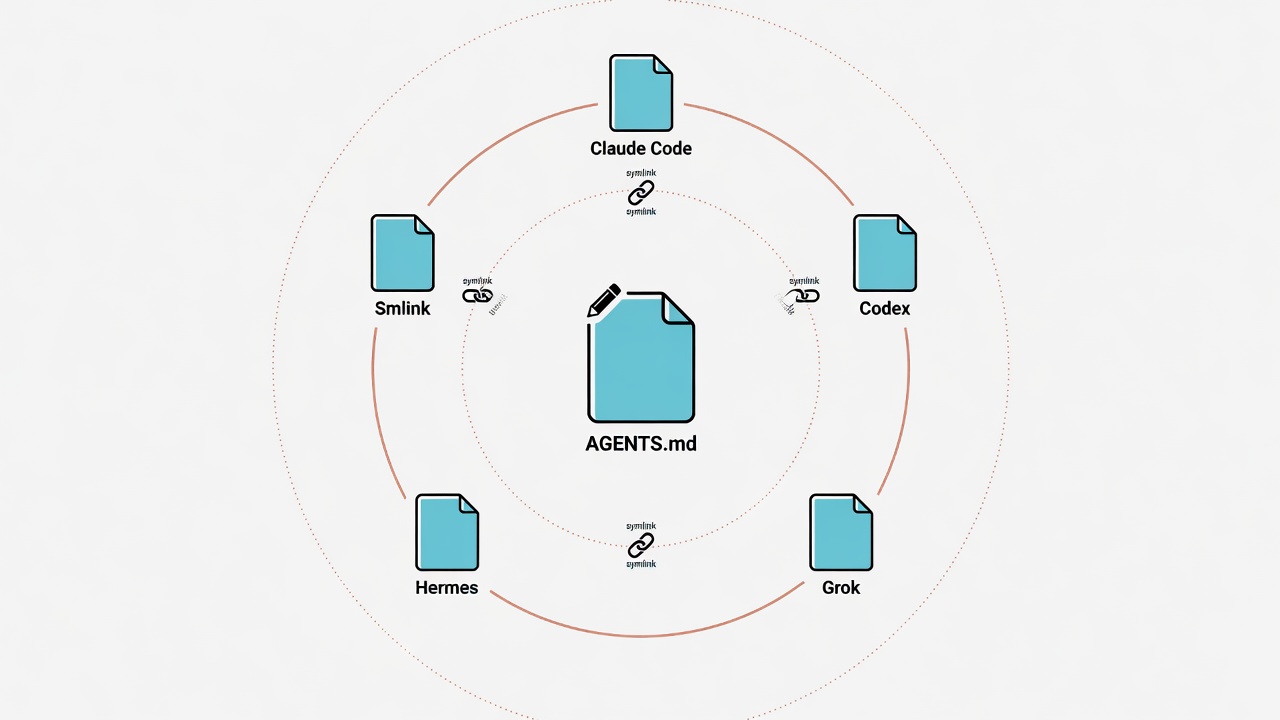
The cross-platform layer's approach is "memory injection": HQ translates the corporate policies into versions each branch office can understand, then distributes them. Technically, it takes the settings and preferences accumulated in the primary system, translates them into formats each platform understands, and injects them.
Primary System (Claude Code)
    │
    ├── CLAUDE.md ──→ Claude Code native loading
    │
    ├── Translate ──→ .github/copilot-instructions.md (Copilot CLI)
    │
    └── Translate ──→ GEMINI.md (Gemini CLI)
Cross-platform memory injection is a mechanism that translates and syncs an AI Agent's core settings (identity, preferences, rules) to multiple AI platforms, ensuring consistent behavioral performance regardless of which AI tool is in use.
Real scenario: you spend a month fine-tuning behavioral norms in Claude Code. The AI remembers you use Traditional Chinese (Taiwan), prefer R for statistics, follow a specific file naming convention. Switch to Copilot CLI for another project? Everything resets. What greets you: Simplified Chinese comments, Python for statistics, camelCase filenames. Starting over.
The cross-platform layer lets you maintain a single "source of truth," with other platforms auto-syncing through translation scripts or symlinks. It relies on identity and memory layer content, generates no new rules of its own, and only handles translation. Safety baselines get injected into all platforms too.
Design principle: Aim for the "minimum common intersection." That said, this approach has limitations: the capability gaps between platforms are too large for full synchronization. I initially tried to 1:1 translate every setting over. Spent two days and gave up. Then I had the insight: inject the most critical rules first (language preferences, safety baselines, key paths). Accept the differences for platform-specific features (like Hooks). 80% of needs solved with 20% of the effort.
For detailed cross-platform sync practices, see Cross-Platform Sync: One Memory System Across Claude/Copilot/Gemini.
Layer 6: Safety Layer -- The Building's Security System
The safety layer defines behavioral boundaries the AI must never cross, enforced automatically through Hooks.
The safety layer is the building's security system: fire sprinklers in the ceiling, emergency exits at every stairwell, cameras covering every entrance. It's not an isolated module. It permeates every other layer. At its core is an "unbreakable rules list," defining behavioral boundaries the AI must never cross under any circumstances. Enforced automatically through the Hook system.
Honestly, an AI Agent's autonomy is a double-edged sword. The more permissions it has, the more it can do for you, but the more destructive a mistake becomes. I once had the AI run "clean up temp files," and it cleaned my config files too. Had to rebuild everything from scratch. Like hiring a janitor to clean the office, and they recycled the contracts in the safe. That's when I started taking safety layer design seriously.
| Without Safety Layer | With Safety Layer |
|---|---|
| Afraid to let AI touch the file system | Soft delete + sanctum protection, delegate confidently |
| Afraid to let AI run git operations | Force push interception + reset confirmation, use with confidence |
| Afraid to let AI install packages | Security review process, orderly adoption |
| Restrict AI permissions -> low efficiency | Clear boundaries -> bold delegation |
The safety layer is most tightly coupled with the gate layer: the safety layer defines "what must not be done." The gate layer handles "real-time interception." Safety rules also affect the memory layer (which files are sanctum), the routing layer (certain Skills require elevated permission confirmation). The cross-platform layer follows suit; safety rules sync to all AI tools.
Design principle: Better to miss a feature than to miss a risk. In the early stages, set rules strict. Loosen them gradually as your understanding of AI behavior deepens. Doing it the other way around, loose first then tight, usually costs you one incident that makes you want to smash your keyboard. Don't ask me how I know.
For the full safety rules design, see AI Agent Safety Baseline Design: My 10 Unbreakable Rules.
How the Six Layers Collaborate
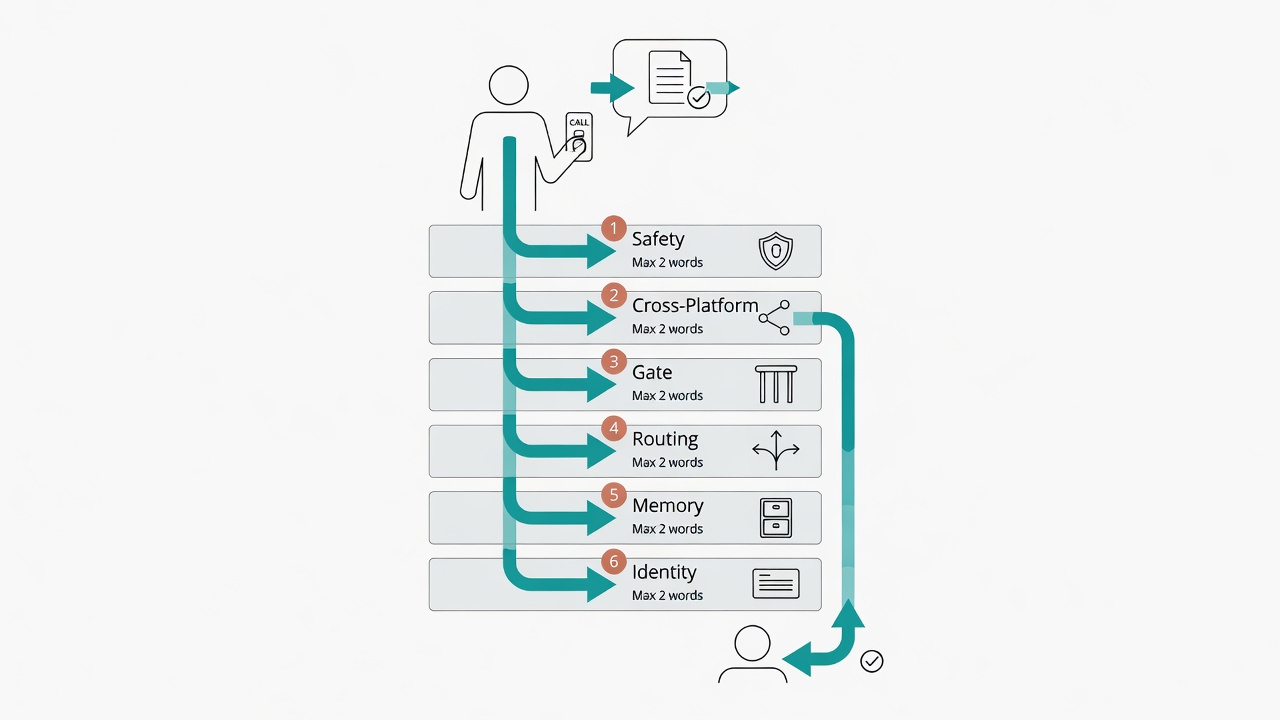
When you issue a single instruction, the six layers each activate behind the scenes to complete the task together.
After covering all six layers, you might be wondering: "So what does it actually look like when it runs?"
Let's walk through a real scenario. Say you tell the AI: "Write me a popular science article about the NLRP3 inflammasome."
- Identity layer: The AI loads your base settings, knows to use Traditional Chinese (Taiwan), knows you're a biotech professor.
- Memory layer: The AI queries fact memory, finds your preferred popular science writing style, past related articles, target audience of general public.
- Routing layer: Identifies the trigger word "popsci," auto-loads the popular science writing SOP, template, and de-AI skills.
- Gate layer: When the AI is about to read the literature database, the Hook checks whether the path is valid. When the AI is about to write a file? The Hook confirms the target isn't in the sanctum.
- Cross-platform layer: If you switch mid-task to another AI tool to continue editing, it's already loaded with the same language preferences and formatting requirements.
- Safety layer: Throughout the process, ensures the AI won't accidentally delete your literature database, won't send an unfinished draft, and won't install a sketchy text processing package.
You typed one instruction, 12 characters. Six layers each running in the background. Like walking into a building and pressing the elevator button: access control, HVAC, lighting, and security all activate simultaneously. You don't even need to know they exist.
Three Core Architecture Principles
The three principles are separation of concerns, incremental adoption, and human always in the loop.
After six months, I've distilled three principles. Not from textbooks. From stepping on mines.
Principle 1: Separation of Concerns
Each layer handles only its own business. The memory layer doesn't handle safety. The safety layer doesn't handle routing. The routing layer doesn't care about memory formats. Sounds like a software engineering cliche? In the AI Agent context it's especially critical. Because you'll constantly want to "just add one more rule" to some config file. Resist. For example, I changed fact memory from YAML to JSON. Only modified the memory layer's read/write logic. Every other layer: zero impact.
Principle 2: Incremental Adoption
You don't have to build all six layers at once. I didn't either. This architecture grew incrementally:
| Phase | What You Build | Time Investment | Payoff |
|---|---|---|---|
| Step 1 | Identity layer (CLAUDE.md) | 30 minutes | Stop re-explaining preferences |
| Step 2 | Memory layer (fact.yml + scratchpad) | 1-2 hours | Accumulate knowledge across sessions |
| Step 3 | Safety layer (rules/safety.md) | 30 minutes | Prevent destructive operations |
| Step 4 | Gate layer (basic Hooks) | 1-2 hours | Automated safety checks |
| Step 5 | Routing layer (SOP dispatch) | 2-3 hours | Trigger words auto-load workflows |
| Step 6 | Cross-platform layer (memory injection script) | 1-2 hours | Consistent multi-tool experience |
The first three steps take half a day. After that you have an AI Agent that "remembers who you are, accumulates learning, and won't self-destruct." The remaining three layers? Icing on the cake. Add them when you have time. No rush.
Principle 3: Human Always in the Loop
No matter how complete the architecture gets, final decision-making authority stays with the human. "Irreversible operations require confirmation." "Sanctum writes require review." "Intercepts report back instead of auto-fixing." All reinforcing the same thing: an AI Agent is an assistant. Not a stand-in.
Common Architecture Mistakes
The most common mistake when designing the architecture is stuffing too much into a single config file.
I hit plenty of potholes during the design process. Here are ones I actually made:
Cramming everything into CLAUDE.md. My CLAUDE.md once ballooned to 400 lines. Result? AI loaded slowly, and rules near the top got "diluted" by the time it processed rules at the bottom. Pile up enough garbage and it stops working. I later cut it to 30 lines. Everything else moved to memory and routing layers. Rule of thumb: over 200 lines and you need to split.
Not splitting memory into tiers. Preferences, decision records, scratch notes all in one file. Like putting contracts, sticky notes, and lunch menus in the same drawer. The AI loads a pile of irrelevant info every time, can't figure out what's needed for the current task. Slow and messy.
Safety rules only in the prompt. Telling the AI in conversation "don't delete files" works about as well as a "please don't litter" sign on the sidewalk. Useless. Truly useless. It will escape every text-based rule you write. You need Hooks for hard interception.
Premature optimization of routing. Only 3-5 workflows but building a complex trigger word matching system. At the start, simple string matching is enough. Wait until you have over 10 workflows before considering advanced routing. I used string matching for my first three months. Worked just fine.
Next Episode Preview
The above is the six-layer architecture design blueprint. Part 2, "Building a Complete Agent Workflow from Scratch (Part 2): Hands-On Deployment," walks you through building the six layers one by one:
- Starting from an empty directory, create the first version of CLAUDE.md
- Set up the three-tier memory architecture file structure
- Write your first SOP dispatch table
- Implement a basic PreToolUse Hook
- Set up a cross-platform memory injection script
- Validate the entire system with one complete task
If you can't wait for Part 2, you can grab the architecture blueprint's complete diagrams and config file templates now.
Frequently Asked Questions
Addressing common questions, including limitations and potential risks of this approach.
Q: Do I need to know how to code to build an AI Agent system from scratch?
A: The identity and memory layers only require editing Markdown and YAML. No coding needed. The routing and gate layers involve simple Bash scripts, but it's pattern-matching-level logic. No deep programming background required. For basic environment setup, see Claude Code Complete Guide.
Q: Does this architecture only work with Claude Code?
A: The core concepts (layered design, memory separation, trigger word routing, safety baselines) apply to any AI Agent framework. Implementation details vary by platform. Claude Code uses CLAUDE.md for the identity layer; other tools use different config file formats. But the design principles are universal.
Q: How long does it take to build all six layers?
A: From zero to a basic system (identity + memory + safety layers), about half a day. Adding routing, gating, and cross-platform takes another 1-2 days. After that it's continuous iteration, enriching each layer as use cases grow.
Q: What's the relationship between the AI Agent architecture and CLAUDE.md design philosophy?
A: CLAUDE.md Design Philosophy focuses on the identity layer's design details, a deep dive into "Layer 1" of the six-layer architecture. This article is the bird's-eye architecture blueprint. I'd suggest reading this article first for the full picture, then diving into the topic-specific articles for each layer as needed.
Q: What are the risks or limitations of this architecture?
A: The biggest limitation is maintenance cost. The more layers you have, the more mental effort goes into keeping them in sync. Also, over-reliance on trigger word routing might cause you to overlook AI performance in non-default scenarios. Start with three layers, confirm stability, then add more.
Q: Is this system over-engineered?
A: Depends on how much you use it. Working with an AI Agent more than 2 hours a day? This system pays for itself in the first week. Chatting occasionally and asking questions? A CLAUDE.md plus a simple memory file is enough. No need for six layers. Six layers is the full version. Pick what you need.
Want to Go Deeper?
I've put together an AI Agent Memory System Design Blueprint. It includes the complete three-tier memory architecture diagrams, config file templates, and memory write rule examples.
Download the free memory system blueprint
Next: Building a Complete Agent Workflow from Scratch (Part 2): Hands-On Deployment