
Your Research Bottleneck Isn't Intelligence. It's Bandwidth.
Last Friday at 11 PM, I was still manually scanning through 47 PubMed search results, copying abstracts into Obsidian, tagging which ones deserved a full read. The postdoc in the office next door hadn't left either — she was revising the third draft of a popular science article because the first two were rejected for being "too academic." This scene plays out in virtually every research lab, every week.
The "AI Research Accelerator" is a methodology for systematically integrating AI tools into academic workflows. The core idea isn't letting AI do your research — it's letting AI handle the repetitive, time-consuming, low-creativity tasks so your brainpower goes back to where it's actually needed: judgment.
I'm an assistant professor and also the R&D director at a biotech company. Over the past six months, I've used Claude Code to build an AI workflow spanning literature management, popular science writing, statistical analysis, and academic presentations. This article will show you where researchers can bring AI into their work — and why the "acceleration camp" is a better bet than the "fear camp."
Two Narratives: AI Replaces You, or AI Accelerates You?
Every few months, a new wave of anxiety sweeps through academia: "Will AI make researchers obsolete?"
Let me give you my take directly: the question is wrong.
The replacement camp reduces a researcher's work to "reading papers, writing manuscripts, running stats," then argues AI can do each one. The problem is that the core of research was never those tasks themselves — it's the judgment behind them. Why does this paper matter? Where's the logical gap in this experimental design? What biological significance does this outlier represent?
The acceleration camp thinks entirely differently. AI doesn't touch your judgment. It touches your bandwidth.
| Dimension | Replacement View | Acceleration View |
|---|---|---|
| Literature | AI reads all papers for you | AI screens and summarizes; you decide what to read |
| Writing | AI writes the entire manuscript | AI assists with drafts and formatting; you control the argument |
| Statistics | AI auto-selects models and runs data | AI helps you iterate on analysis strategies; you interpret results |
| Presentations | AI auto-generates slides | AI handles layout and visualization; you design the narrative |
The key is in the third column: at the end of every row, the decision stays with you. AI is the assistant, not the boss.
Four AI Entry Points: A Researcher's Field Map
Over the past six months, I've systematically integrated AI into four work areas. Here's the pain point for each, how I use AI to address it, and what you can expect.
Entry Point 1: Literature Management and Digestion
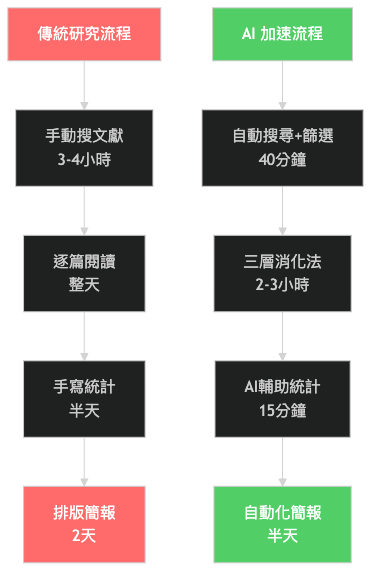
Pain point: Dozens of new papers appear in your field every week. The time cost of manually searching, downloading, reading, and filing is enormous. Worse, you spend hours reading abstracts only to find that three or four are actually relevant.
What AI can do: Automate search, batch download, AI-extract key points from abstracts, and build relationship maps across papers. My current system handles a library of over five thousand papers, with new literature automatically entering the digestion pipeline each week.
What you save: The time from "search" to "decide whether it's worth a full read" shrinks dramatically. Literature screening that used to take an entire afternoon is now largely automated, with initial filtering wrapping up quickly.
Want to see exactly how? How I Read 50 Papers a Week with AI has the full walkthrough.
Entry Point 2: Popular Science and Academic Writing
Pain point: Researchers constantly need to translate expert content for different audiences. Popular science articles require "translating" jargon, grant proposals require "selling" research value, and manuscripts require "precise" methods. Each genre has a completely different voice, and switching costs are high.
What AI can do: Provide draft frameworks, assist with terminology conversion, run a "de-AI" pipeline so the text reads like a human wrote it, and quickly generate versions for different genres based on templates.
What you save: Drafting time drops significantly. More importantly, the psychological barrier of "facing a blank document" decreases. You focus your energy on revision and injecting personal perspective instead of starting from zero.
The full popular science writing workflow is in Writing Popular Science with AI: The Complete Process from Paper to Readable Article.
Entry Point 3: Statistical Analysis
Pain point: Choosing the wrong statistical method, forgetting to check assumptions, producing figures that don't meet journal requirements. Any of these can get your submission sent back. The more realistic problem: many researchers' statistics skills haven't advanced past their graduate coursework, and they stall when encountering new methods.
What AI can do: Help select appropriate statistical methods, automatically check data assumptions (normality, homogeneity of variance, etc.), produce publication-quality figures, and explain what the results mean. I pair R with Claude Code to run the entire analysis pipeline from method selection to final figures in one flow.
What you save: Fewer cycles of "Google the method, find example code, tweak parameters, debug, adjust figure formatting." Figure formatting alone is a major win — AI outputs directly to journal specs, eliminating rounds of manual tweaking.
The hands-on tutorial is in AI-Assisted Statistical Analysis: R x Claude Code in Practice.
Entry Point 4: Academic Presentations
Pain point: Making slides is one of the tasks researchers procrastinate on most. Literature needs to be reorganized into visual content, figures need re-formatting, and speaker notes need writing separately. Many people don't start until the night before, and the quality shows.
What AI can do: Automatically extract key points from literature, generate slide skeletons, and handle layout and visual elements. I use a literature-based presentation SOP with a clear six-step process from literature search to HTML slide output.
What you save: Most of the "grunt work" of presentations (layout, finding images, adjusting formatting) goes to AI. You focus on narrative logic and the rhythm of your oral delivery.
Don't Wait for the "Perfect AI Tool"
Many researchers tell me: "I'll wait until AI is more mature."
The problem with that statement is that AI tools' value isn't just in the tool itself — it's in your ability to use it. Every time you use AI to process literature, assist writing, or try statistical analysis, you're building a new research capability: the ability to collaborate with AI.
This ability can't be acquired overnight "once AI gets good enough." It takes practice, mistakes, and understanding what AI can and can't do.
My advice: start with one small area. You don't need to build the entire system at once.
- If you spend the most time on literature screening, try an AI summarization tool first
- If writing is your biggest headache, try having AI generate a draft framework first
- If your statistics keep getting revision requests, try AI-assisted method selection first
- If you're always rushing presentations, try AI-generated slide skeletons first
Each entry point can start independently. You can connect them into a full workflow later.
FAQ
Q: Does using AI in research violate academic ethics?
Most academic institutions currently hold that AI can serve as an assistive tool, but the researcher bears full responsibility for the final content. The key is transparency — if you use AI to help screen literature or draft text, state it in your methods. It's the same logic as using Grammarly for English editing or R for statistics.
Q: Will AI make my research look the same as everyone else's?
No, because AI processes workflows, not perspectives. Two researchers using the same literature digestion pipeline might end up with overlapping papers, but how they interpret and connect those papers to their own hypotheses will be entirely different. AI accelerates the speed to the judgment point, not the judgment itself.
Q: Can researchers who can't code still use this?
Yes. AI tool interfaces are rapidly lowering the barrier. Many operations don't require writing code — just giving instructions. That said, if you're willing to learn some basic command-line operations, you'll unlock significantly more functionality. The tutorials in this series will provide versions that don't require a programming background whenever possible.
Q: How is Claude Code different from ChatGPT? Is it suitable for researchers?
ChatGPT excels at conversational interaction — good for Q&A and short text generation. Claude Code has a different positioning: it can directly read and write files on your computer, execute code, and operate tools, making it better suited for building automated workflows. If you just occasionally ask AI a question, ChatGPT works fine. If you want to build a systematic research assistance pipeline, Claude Code's architecture is a better fit. The technical track's The Complete Guide to Claude Code has a more detailed comparison.
Want to Go Deeper?
I've compiled a free guide: The Researcher's AI Toolkit: 5 Workflows You Can Use Right Now, covering literature screening, abstract generation, statistics selection, popular science writing, and presentation scaffolding.
Next up: How I Read 50 Papers a Week with AI