What if the most powerful thing about AI wasn't its general intelligence, but its ability to remember exactly what you taught it? That's the premise behind Skills — a mechanism that lets you write down how a job gets done, so AI can execute it reliably every time. No coding required.
What Is a Skill? A Handbook for Your AI
A Skill is a Markdown file. You write down how a task should be done, and the AI reads it and follows the instructions.
Think of it like onboarding a new team member. Right now, every time you delegate a task, you re-explain everything from scratch. A Skill is the written SOP you hand them instead: "here's how we do this." The difference from a real employee is that this one doesn't forget, doesn't cut corners, and runs 24 hours a day.
A Skill file has two essential components: metadata (what this Skill is, when it should activate) and operational instructions (the actual step-by-step process). The single most important field in the metadata is description — write it vague, and the AI can't find the Skill; write it precisely, and the AI knows to activate before you even finish your sentence.
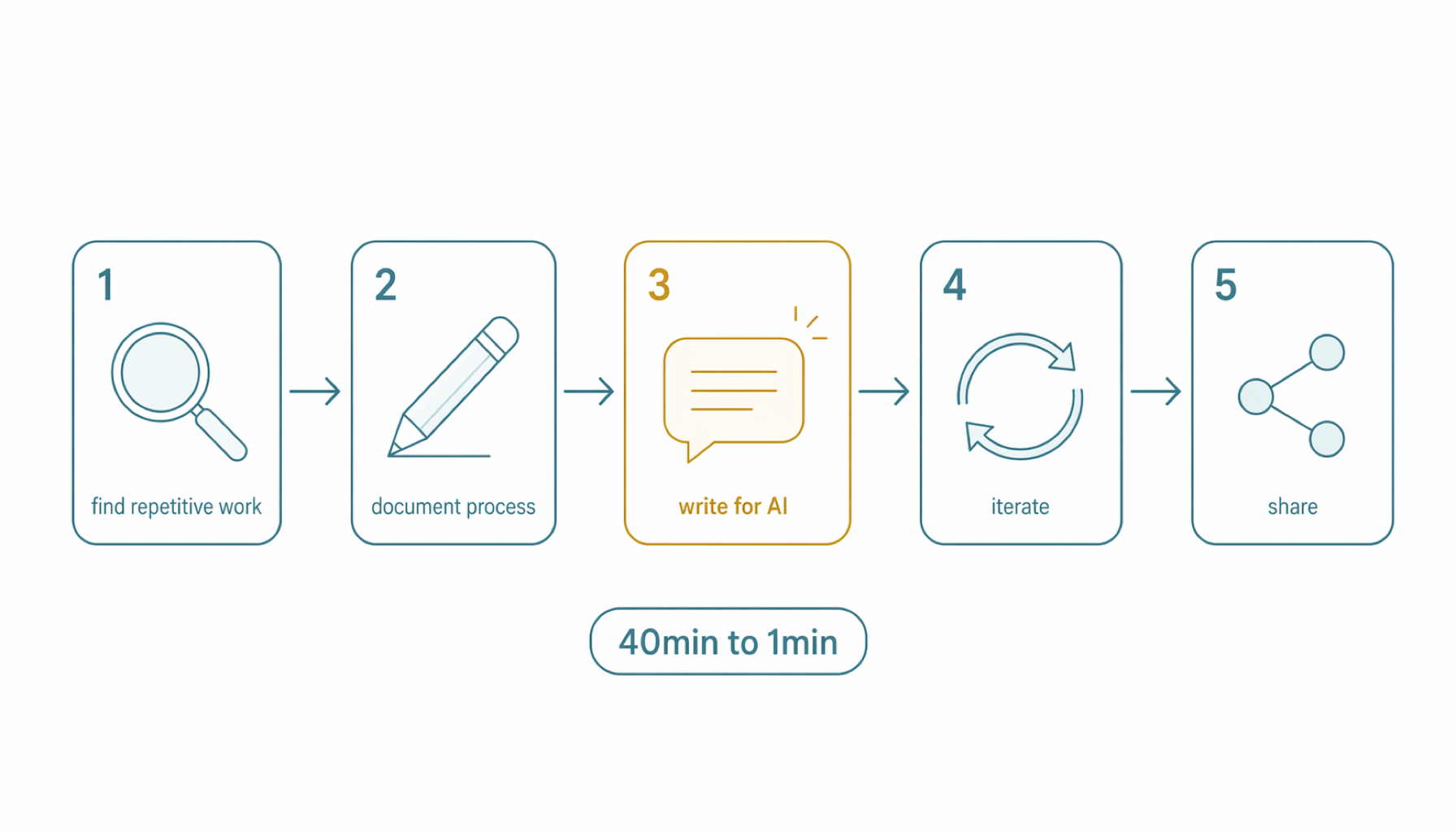
The Five-Step Method
Step 1: Find Your Repetitive Work
Pull up your last week of work. Find the tasks that are "basically the same every time, but still take real effort each time." Morning news digests. Weekly status reports. Summarizing a new paper every time one lands in your inbox.
The test is simple: if you catch yourself thinking "here we go again" — that task is a Skill candidate.
Step 2: Run It Manually and Document Every Step
Before you can teach the AI, do the task yourself one more time — and write down every single step as you go. Not "organize the news," but "open these three sites → filter the last 24 hours → sort by topic → summarize the core point of each article → output using this template."
This step is about converting tacit knowledge into an explicit process. Most people discover that tasks they thought were simple actually contain dozens of judgment calls. Getting those out of your head and onto paper is the whole point.
Step 3: Rewrite It for the AI in Plain Language
Take your Step 2 documentation and convert it into Skill format. No programming language needed — write the way you normally talk. The only rule: every step must be specific enough that the AI doesn't have to guess. "Write it well" is a bad instruction. "Use formal English, keep each paragraph under 120 words, use imperative sentences for headings" is a good instruction.
Step 4: Iterate 2–3 Times
Your first Skill won't be perfect. Run it once, look at the output, identify where it missed, update the Skill, run it again. Two or three rounds is usually enough to reach acceptable quality.
The right mindset: don't try to get it right on the first attempt, embrace the iteration. Each revision teaches the AI a more precise version of your standards.
Step 5: Share Selectively
Once the Skill works, you can keep it private or share it with your team. For team use, manage it in Git — Markdown is naturally version-controllable, and every change has a traceable history. If something breaks, you can roll back.
Best practice for team-level Skills: store them under .agents/skills/ in the project directory, not in personal global settings. Different projects can maintain different versions of the same Skill without interfering with each other.
Real Case: 40 Minutes → 1 Minute
Developer 泊舟 shared his experience building an "AI daily briefing Skill." His morning routine used to take 40 minutes: browse multiple sources, filter relevant news, format it into a summary. After building the Skill, a single command handles the entire workflow, with consistent output quality.
A second case: an "article illustration Skill" built on an open-source foundation. The AI doesn't generate the images — it standardizes the judgment of "what kind of image does this article need," producing a precise brief that can be handed to an image generation tool.
From a Single Skill to a Skill Ecosystem
As your library grows, you need tools to manage it. Three foundational meta-Skills have emerged as standard practice: find-skills (search your library for the best-fit Skill for any task), skill-creator (generate a new Skill skeleton from a natural language description), and skill-vetter (security review to ensure third-party Skills don't contain suspicious behavior).
These three cover the full Skill lifecycle: discover → build → audit → use → iterate.
The Bigger Picture
Skills are changing what "AI-assisted" means — from "re-explain everything each session" to "teach it once, it remembers forever." They upgrade the AI from a general assistant to a specialized employee whose capabilities compound with every iteration you do.
The task you repeat most often is your first Skill. Write it today.
References
- 泊舟 (2026). 实战教学:从0到1写出一个你自己的Skill. Tech Column.
- @dotey (2026). Thread on team-level Skill management with Git. X/Twitter.
- Anthropic (2026). Claude Code Skills Documentation. docs.anthropic.com.
- Random Labs (2026). Skill chaining and why skills should be actions. Slate Blog.