
Opening: Why You're Stuck
LinkedIn is flooded with people saying "I built an AI agent that...". You decide to follow a tutorial. You fall into the LangChain documentation black hole. You install 47 dependencies. You configure three types of vector databases. You read five research papers. Then—your agent still can't reliably send an email.
You're not the first. You won't be the last.
Here's the secret: the core concept of an agent is actually simple. Framework complexity comes from optimization and abstraction, not the concept itself.
The core loop is less than 20 lines of code. Accumulate messages → pass to LLM → LLM decides which tool to call → execute → return feedback → repeat. That's it.
Why are frameworks so complex? Because they're doing other things—memory management, failure recovery, monitoring, serialization, type checking. Those are all useful. But at the start, you don't need any of them.
This article cuts through the fog. Starting from a 20-line core loop to understand agents. Then five workflow patterns to pick the right architecture. Then the secret of tool design—it determines your agent's capability ceiling. Finally, a 5-minute quick-start guide.
From "what even is an agent" to a working prototype in one afternoon. This guide skips the frameworks and starts with the 20-line loop everything else is built on.
1. The Real Face of an Agent: Less Than 20 Lines of Code
Forget the word "agent". It's confusing.
Imagine a friend sitting next to you with a notebook, capable of thinking, with a few tools at hand. You give her a task. She thinks for a moment. Then: "I need to check a file, hold on." She checks it. "The file says this, but I need to confirm one more detail." She uses another tool. Asks a question. Gets an answer. Finally says: "Okay, done. The answer is X."
That's an agent.
The core loop:
while task_not_complete:
    collect_messages(user_input + previous_results)
    send_to_llm(with: "these are your available tools")
    llm_decides:
        if "I'm done" → return answer, exit loop
        if "I need tool X" → call tool
    execute_tool(get result)
    add_result_to_messages(repeat)
That's all. No hallucination magic. No mysticism.
Three components of an agent:
- Model — the thinking brain. GPT, Claude, any LLM that does function calling.
- Tools — the executing hands. File reading, API calls, database queries.
- Instructions — the action rules. "Your goal is X, constraints are Y, prioritize Z".
Those three things together, you have an agent.
LangChain, AutoGPT, and others are packaging that loop into reusable components—adding memory management, failure recovery, monitoring. Sounds good. But that's not the beginner's problem. The problem is frameworks wrapping simple things in complex APIs, and you still don't understand why it doesn't work.
Key advice: Don't start with frameworks. Start with the loop. Once the loop is clear, frameworks are just accelerators.
2. Five Workflow Patterns: Pick the Right One
Not all agents are the same. Master these five patterns and you can pick the right architecture for 80% of problems.
| Pattern | Structure | Best For | Complexity |
|---|---|---|---|
| Prompt Chaining | A → B → C → Result | Fixed sequential steps | ★☆☆ |
| Routing | Classify → Choose path → Execute | Multiple task types | ★★☆ |
| Parallelization | Run tasks simultaneously → Collect | I/O-bound work | ★★☆ |
| Orchestrator-Worker | Master dispatches → Sub-agents execute | Complex decomposed projects | ★★★ |
| Evaluator-Optimizer | Generate → Evaluate → Improve → Repeat | High-quality output | ★★★ |
Beginner Path
Start with prompt chaining. Hard-code steps. Watch it work.
- Week 0: Prompt chaining. Fixed steps only.
- Week 1: Add one tool. Watch LLM decide when to call it.
- Week 2: Try routing. Add a second tool, let LLM choose.
- Week 3: Consider parallelization if steps can run simultaneously.
Only when a single agent clearly can't handle the task, consider orchestrator-worker.
Anthropic Principle: One good agent + quality tools > Complex multi-agent system
3. Tool Design Determines the Agent's Ceiling
There's one factor that determines an agent's capability more than the model itself—tool design.
A bad tool will destroy even the smartest LLM. A good tool can make a weak model look impressive.
Three Generations of Evolution
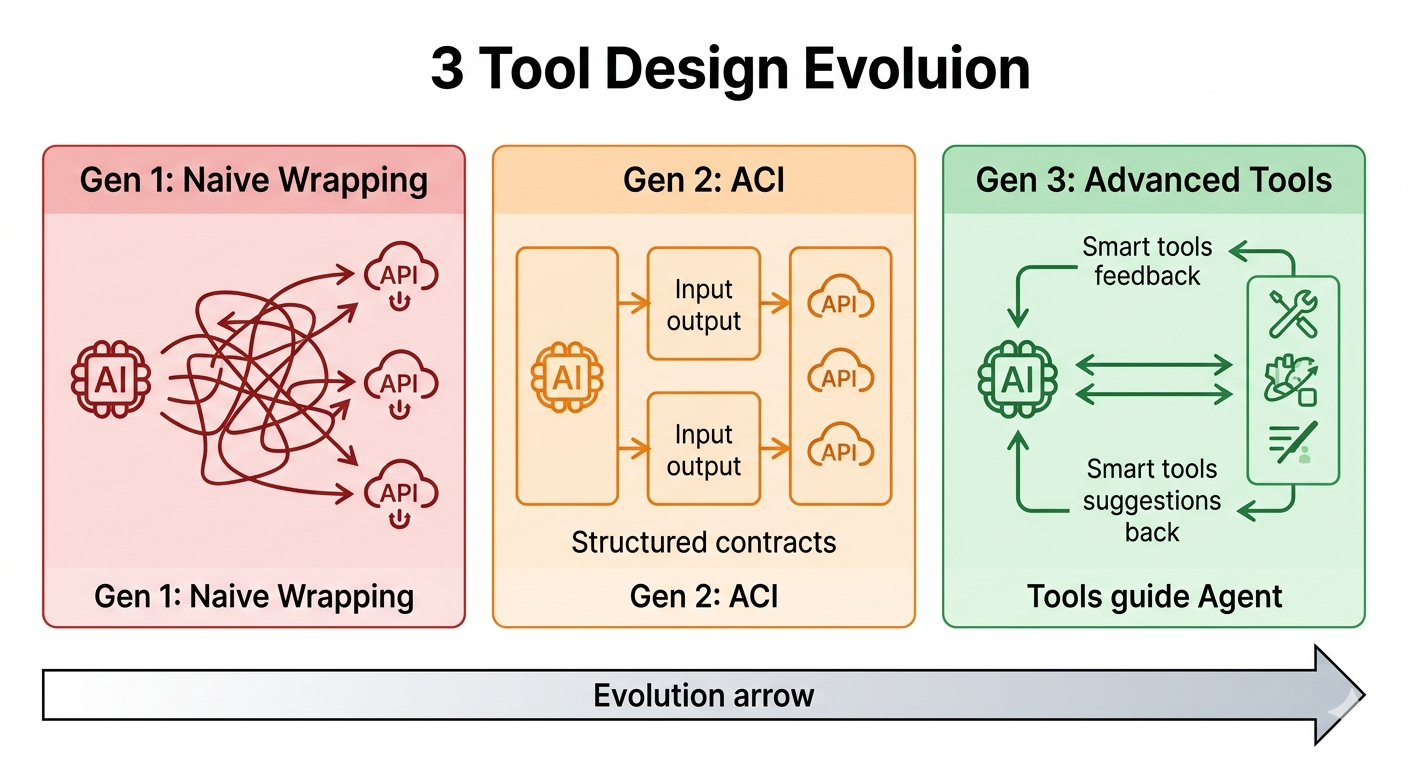
Gen 1 dumps raw APIs at the LLM and hopes for the best. Gen 2 adds typed contracts so the LLM knows what to expect. Gen 3 tools return decision signals — telling the agent not just what happened, but what to do next. Each generation roughly doubles reliable task completion.
First Generation: Naive API Wrapping — dump the API docs at the LLM. Result: wrong parameter formats, constant failures. LLM can't understand API details.
Second Generation: ACI (Agent-Computer Interface) — define tools with structured input/output contracts.
Tool: read_file(path: str) -> str
Description: Read file content at path, return as plain text.
LLM now knows how to use it and what to expect.
Third Generation: Advanced Tool Use — tools don't just return data, they "guide" the agent.
Tool: search_documents(query: str) -> {
  "results": [...],
  "next_step": "browse_result_0" or "refine_query",
  "quality_score": 0.95
}
The tool suggests the next step. Agent reasons less, decides better.
Granularity Principle: One Tool, One Clear Task
❌ Bad: def agent_do_everything(command: str) — reads files, writes files, queries DB, calls APIs, sends email.
✅ Good: Separate functions: read_file, write_file, query_database, call_api, send_email.
Why? LLMs reason more accurately on fine-grained tasks. One tool doing ten things confuses the model.
Tool Clarity > Model Capability
One clear tool + weaker model > Vague tool + powerful model.
Tools should return "decision-relevant" data:
✅ { "status": "success", "user_count": 42, "next_step": "invite_users", "completion_percentage": 85 }
❌ { "raw_json": {...}, "metadata": {...}, "internal_state": {...}, "debug_info": {...} }
The first tells the LLM what's next. The second forces it to search garbage for signal.
Vectorless RAG is a concrete example of this principle in action: replace a vector database with a hierarchical summary tree the LLM navigates by reading summaries. No embeddings, no vector DB, and the reasoning path is fully interpretable. Pick the right tool design, and you can simplify a complex system by 80%.
4. Memory: The Agent's Lifeline
Ever see an agent execute the same task ten times and make the same mistake every time?
Reason: no memory.
LLMs don't remember anything. Each call is independent. So agent memory is something you build intentionally. Memory isn't "stuff all history into context window"—that's lazy. Real memory is structured.
Four-Layer Memory Architecture
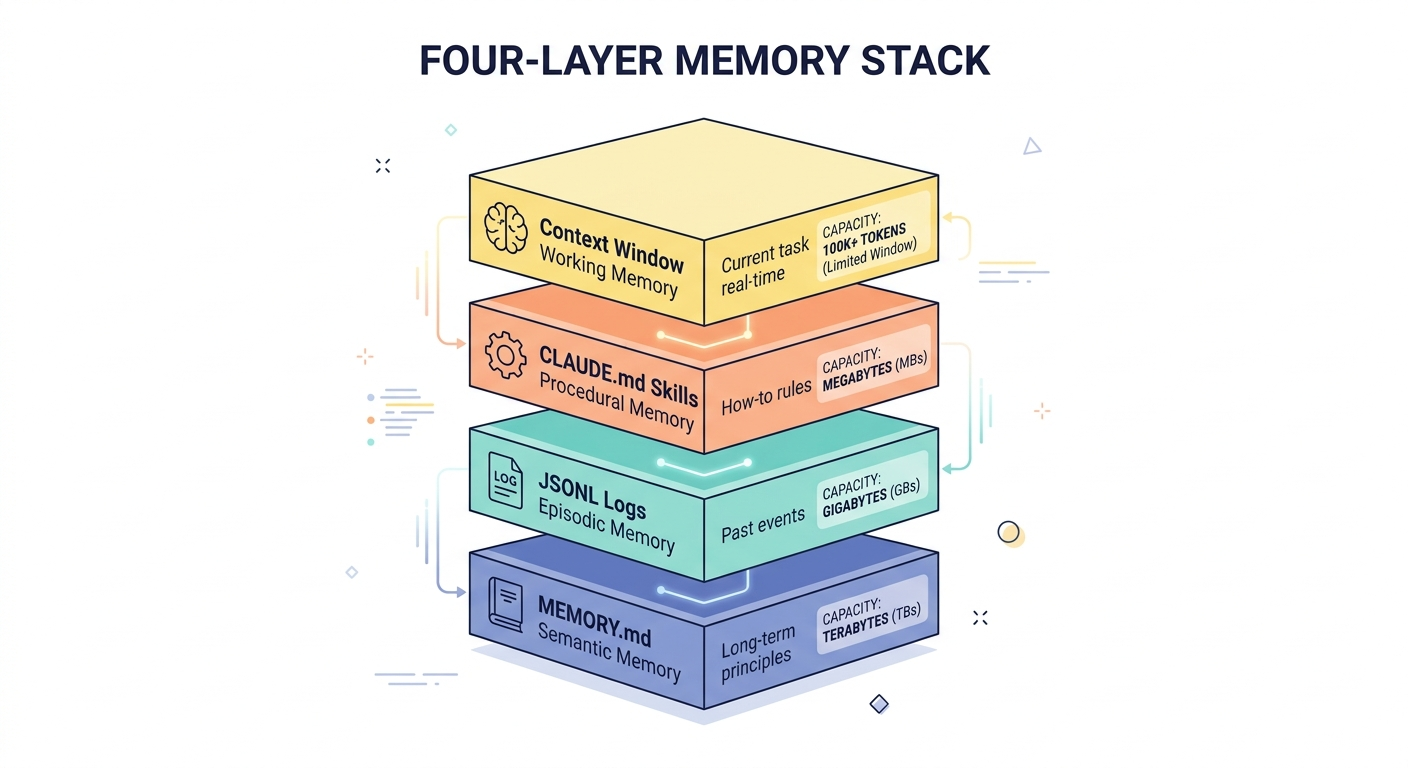
Bottom to top: context window holds what the LLM can see right now; skills store procedural rules that survive across sessions; the JSONL log captures every event for statistical retrieval; MEMORY.md synthesizes what you've learned into durable knowledge. Layers compound — a well-maintained stack after 30 days outperforms a fresh agent with a 200-line expert prompt.
Layer 1 — Context Window (Working Memory): Current conversation + tool results. Fast but limited (4K–200K tokens). Resets every session.
Layer 2 — Skills (Procedural Memory):
CLAUDE.mdfiles accumulating failure rules and best practices. Survives across conversations. Grows thicker over time — agent grows smarter.Layer 3 — JSONL Log (Episodic Memory): Structured event log, one line per task execution. Query by time, task type, or result. Enables statistical analysis ("which tasks fail most?") and decision reference ("how was this handled last time?").
Layer 4 — MEMORY.md (Semantic Memory): Synthesized knowledge — user preferences, system constraints, verified rules. Updated weekly or monthly. The "what we learned" layer.
Key Insight: Structured Storage + Context Reset
Most people stuff all history into the context window, let LLM summarize, and start next conversation with the summary.
Problem: LLM's summary loses details. "17 edge cases I hit last time" becomes "some edge cases happened."
Right approach: reset context periodically → read from structured memory (JSONL queries, relevant rules) → bring only "decision-relevant" info → start new conversation.
Why does it work? Precise retrieval beats fuzzy summary.
Research from Anthropic and others shows: 3 lines of precise prompt + accumulated memory ≈ 200 lines of expert prompt over the long term. By building up rules in CLAUDE.md and MEMORY.md, a simple agent performs like one that's been hand-tuned for months.
5. Five Things You Can Do in 5 Minutes
Theory's enough. Let's practice.
Minute 1: Pick One Task
Not five. Not ten. One.
Organize my inbox / auto-tag my notes / summarize daily news / check code for common errors. Pick one. Complexity explosion comes from greed.
Minute 2: Write Clear Instructions
## Goal
Read ~/Downloads/inbox.txt
Classify emails by date (old → new)
Label each (Work / Personal / Spam)

## Constraints
- Don't delete anything
- Output format: Markdown list
- If can't classify, ask user (don't guess)

## Priority
1. Accuracy (prefer unclassified over misclassified)
2. Completeness (don't miss items)
3. Speed (but don't sacrifice above two)
Clear instructions determine 70% of agent success.
Minute 3: Give One Tool
read_file(path), web_search(query), or call_api(endpoint, params). One tool, perfect execution, beats three tools, unstable.
Minute 4: Test With Messy Real Input
Don't use ideal inputs. Use your real inbox—mangled date formats, misspellings, symbols. The agent will fail. That's good. Failure shows you the rule's boundaries.
Input: [2026-03-30] Report / [30/03/2026] Notes / [Mar 30, 2026] Spam / 2026.03.30 Invoice
Agent fails: Can't parse dates uniformly
You learn: Need date standardization rule
Minute 5: Turn Failure Into Rule
Every failure: what caused it → why → how to fix → write as rule → add to CLAUDE.md.
# CLAUDE.md
## Date Normalization
- Input formats: "2026-03-30", "30/03/2026", "Mar 30, 2026", "2026.03.30"
- Convert all to ISO 8601 "2026-03-30" for sorting
This is your first memory layer. In a few weeks, 30–50 lines of CLAUDE.md will push your agent's success rate from 40% to 85%.
6. Closing: Stop Consuming Tutorials
Stop watching tutorials.
Stop downloading 47 frameworks.
Stop asking Reddit "is there a complete agent tutorial?"
Open a terminal. Write an agent that organizes your inbox.
It'll suck. Sentences will get stuck. Tool calls will fail. LLM will choose the wrong tool.
Then you fix it.
You read the error. "Oh, it doesn't understand date format." You add a rule.
You try the new version. It works. Then the next edge case appears. It fails again.
You fix it.
Repeat.
This—is the only way to learn agents.
Not theory class. Not certification. Conversation, iteration, failure, repair.
Agents aren't as mysterious as you think. Just a chatbot with a notebook, can reason, can call tools. Your job is teaching it to remember, to decide, when to ask for help.
Good tool design, it gets smart. Memory layers stack, it gets experienced. Clear instructions, it gets reliable.
So go now.
Don't wait for next tutorial. Don't wait for next framework. Don't wait for "smart enough" moment.
Your inbox is waiting. Your project is waiting. Your first agent is waiting for you to start writing.
5 minutes. One task. One tool. Fail. Fix. Learn.
Go.
References
Academic Research
- Anthropic (2024). "Agentic Workflows" — Workflow design fundamentals and best practices
- OpenAI (2023). "Function Calling in Large Language Models" — Tool-calling design principles
- Wei et al. (2022). "Chain-of-Thought Prompting Elicits Reasoning in Large Language Models" — Reasoning paths
- Related: Memory mechanisms, multi-agent evaluation frameworks
Tools and Frameworks
- LangChain — Widely used but complex (reference learning, not recommended for immediate hands-on)
- Anthropic Claude API — Recommended for practicing core loop
- AutoGPT — Reference architecture, learn failure patterns
Advanced Learning
- Papers: Multi-Agent Systems Design Patterns
- Personal projects: Build JSONL memory system, practice four-layer architecture
- Community: Agent development best practices, memory design workshops
Publication: labgrimoire Published: 2026-03-30 Status: Draft Word count: ~2,050 words