
Lead
The easiest mistake in the current AI tooling boom is not that there are too many names. Most people cannot tell at a glance what problem each tool is actually fixing. Some tools are about connection. Some are about workflow. Some try to preserve knowledge over time. Some exist to check the first answer. This article is only about development-workflow tools, not every chatbot or single-purpose plugin on the market.
Does it feel like this to you too?
You open a developer forum.
Another tool shows up.
It promises speed.
You end up more confused.
The useful question is usually not, "Which one is best?"
It is this:
Is this tool helping me connect systems, manage a workflow, preserve knowledge, or verify output?
Once you ask that question, the ecosystem looks less noisy.
You can break it into three layers: connection at the bottom, workflow in the middle, verification at the top.
Layer one: connect the tools first
MCP matters because it gives AI tools a shared way to plug into the outside world.
If you think of an AI assistant as a new teammate, the first thing it needs is not brilliance.
It needs a socket.
It has to plug in before it can help.
MCP, short for Model Context Protocol, is easiest to understand as the USB of the AI era.
Before USB, every device seemed to want its own cable.
That was a mess.
MCP is trying to solve the same kind of mess for AI tools.
It reduces the basics to three building blocks:
- Tools: actions the AI can take, such as querying a database, running code, or sending a request
- Resources: data the AI can read, such as files, API responses, or system state
- Prompts: reusable instruction templates for recurring tasks
That sounds dry.
The practical effect is not dry at all.
Once the bottom layer is standardized, the whole ecosystem has room to grow.
Without that, every new tool means another custom connector, another API style, another pile of glue code.
That is not an ecosystem.
That is wiring work.
Common MCP transport options today include stdio and HTTP+SSE.
You do not need to memorize the spec.
You only need to remember the point: when standardization works, integration stops feeling like a fresh project every time.
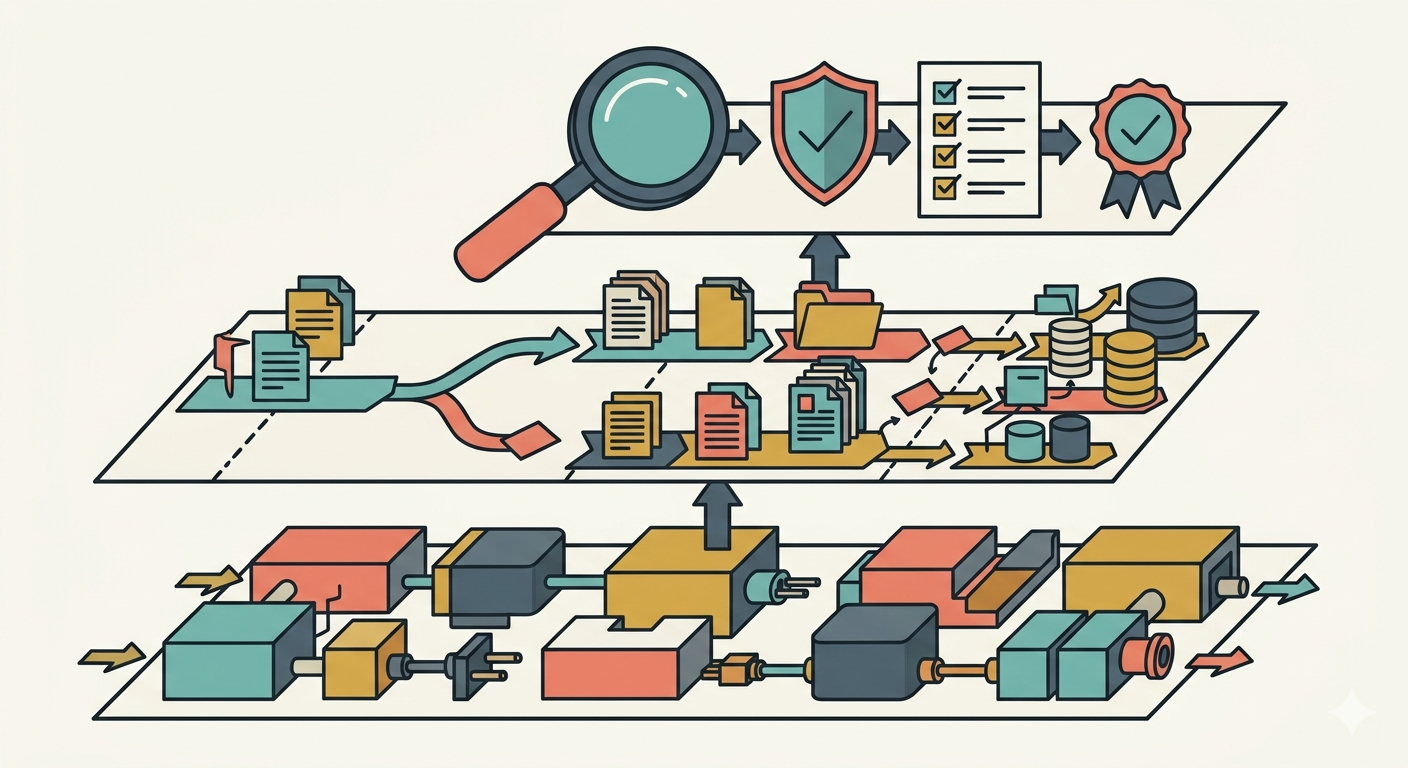
Caption: A three-layer system view: connection at the base, workflow in the middle, and verification at the top. The point is not who wins. The point is what gap each layer fills.
Layer two: workflow is where the real differences appear
Once tools can connect, the hard part becomes turning them into a repeatable way of working.
That is where the 2026 discussion gets more interesting.
The real split is no longer "Can AI do the task?"
It is "Can your process survive the tenth time you run it?"
Three names are useful here: gstack, Superpowers, and Compound Engineering.
They are not clones.
They are closer to different jobs on the same floor.
gstack: good at decisions and testing
gstack is strongest when you want a second angle on a decision.
Commands like /plan-ceo-review, /plan-eng-review, and /qa push work through business review, engineering review, and browser-based checking.
That makes it useful when you are judging a feature, reviewing product direction, or trying to spot risk before you ship.
At that moment, you do not need more ideas.
You need another set of eyes.
Superpowers: good at process discipline
Superpowers is more like a workflow disciplinarian.
It helps teams break work into explicit steps, keep handoffs cleaner, and move at a shared rhythm.
That is valuable when a team needs consistency.
It is less useful when a team is still changing shape every week.
Heavy process can slow small teams down.
And because it focuses on order within the session, the knowledge does not always carry over on its own.
Compound Engineering: good at turning today’s work into tomorrow’s shortcut
Compound Engineering is the tool in this group that leans hardest into knowledge accumulation.
It is not satisfied with solving the task once.
It wants the next similar task to get easier.
Its logic is built around five stages:
- Identify the problem type
- Find the relevant solution
- Connect the supporting documents
- Extract prevention strategies
- Store the context in a searchable base through
/ce: compound
That is the real distinction.
Other tools may help you produce a report.
Compound Engineering is trying to help you produce a report and quietly thicken your playbook at the same time.
Put the three side by side
| Dimension | gstack | Superpowers | Compound Engineering |
|---|---|---|---|
| Main strength | Decisions, testing | Process discipline | Knowledge accumulation |
| Cross-session carryover | Limited | Limited | Strong |
| Growth pattern | Linear | Linear | Compounding |
| Best fit | Small to mid-sized projects | Teams with stable processes | Long-running, knowledge-heavy work |
Why more teams care about whether knowledge sticks
A lot of AI frustration is not about failing once. It is about solving the same thing again next week.
Imagine two teams.
- Team one asks AI from scratch every time
- Team two leaves behind searchable context every time
At first, they may not look very different.
After a while, they do.
The first team keeps improvising.
The second team starts building something closer to an operating system.
That is why people keep talking about knowledge retention, reusable cases, and cross-task continuity.
For an individual, it means fewer repeated dead ends.
For a team, it means less institutional amnesia during handoffs, turnover, and project switches.
| What happens over time | Linear workflow | Compounding knowledge workflow |
|---|---|---|
| First similar task | Roughly the same | Roughly the same |
| Fifth similar task | Still relies on memory | Starts reusing earlier solutions |
| Tenth similar task | Still re-explains the background | Already has cases and prevention logic |
A quick question
What is your real bottleneck right now?
Is it connection, workflow chaos, or the fact that lessons never seem to stay put?
That question is usually more useful than another list of trending tools.
What Compound Engineering v2.60.0 is actually adding
The interesting part of this release is not a flashy new label. It is the way a knowledge-focused tool moves closer to everyday engineering work.
The most concrete number here is 49%.
According to the project brief, v2.60.0 reduced false positives by 49% by tying mandatory code review to confidence scoring.
In plain English, the system is not only saying, "This might be a problem."
It is also saying, "Here is how sure I am."
That matters because teams can finally rank the warnings.
Not every alert has to sound like a fire alarm.
The second change is that /ce:work became more flexible.
You can run different stages for different tasks, and you can change the order.
That sounds small.
It is not.
Real teams rarely need the full pipeline every single time.
The third change is interactive planning.
Instead of charging forward from the first instruction, the system asks questions back.
That slows the first minute down a little.
It can save a lot of backtracking later.
Layer three: in the end, it comes back to verification
Once AI can produce faster, the valuable skill shifts toward checking the first answer.
That is what the third layer is about.
Call it review, QA, handoff validation, or cross-checking.
The names vary.
The idea does not: do not trust the first draft just because it arrived quickly.
Codex: let another angle challenge the work
One useful pattern is to ask another AI system to inspect the output, and sometimes to do so adversarially.
That is where Codex fits.
Typical uses include:
- standard review against known rules
- adversarial review that deliberately looks for holes
- handoff review to see whether another person can continue the work
- multi-vendor review, so one model is not checking itself forever
Claude Code plus Stitch 2.0: connect design to implementation
Another path is to connect design and implementation much more tightly.Stitch 2.0 can generate both a UI direction and a design.md specification.Claude Code can then implement from that spec through MCP.
That changes the handoff.
You are no longer saying, "Please write some code."
You are saying, "Implement this design and this spec."
The process becomes easier to read:
design → design.md → implementation → review → verification
This is especially useful in high-risk settings.
Medical software, finance, and infrastructure all punish casual mistakes.
That said, not every small task deserves the full chain.
A tiny internal script or a one-line UI label usually does not need a ceremonial verification stack.
This layer is most useful when the cost of being wrong is high, the handoff is messy, or the work is hard to inspect by eye.
That boundary matters.
Otherwise, the process turns heavy fast.
You already know this instinct from other fields.
Documents get copy-edited.
Financial statements get reviewed.
AI output needs its version of that, too.
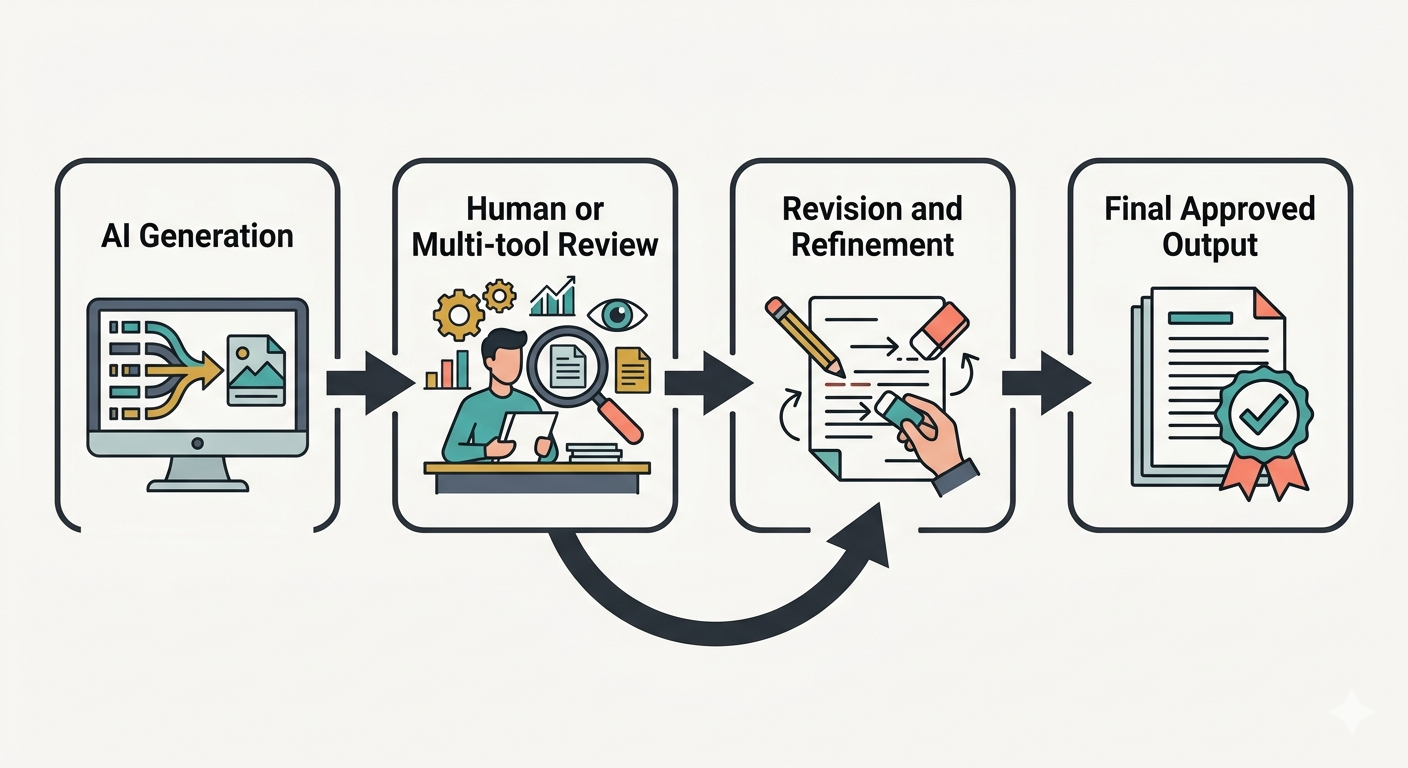
Caption: A simple path from generation to review, revision, and final approval. Speed and quality do not have to be opposites if the checking step is designed on purpose.
Six Boris features that more people should know about
If the three layers are the main strategy, Boris’s advanced features feel more like the hidden tools experienced users quietly keep nearby.
/loop: rerun a task every 5 to 30 minutes, useful for monitoring and long-running checksgit worktrees: work in parallel without constant branch switching/batch: spread work across parallel execution units--bare: skip part of the startup overhead for faster entry--agent: create a custom agent persona that remembers how you like to work/voice: speak instead of typing when you want faster capture or hands-free input
These are not things everyone needs every day.
But in the right context, they remove a lot of friction.
So how should a regular person build a stack?
The practical move is not buying everything at once. It adds layers in this order: connection, workflow, then verification.
Three questions are usually enough for the first pass:
- Is this helping me connect tools or manage a workflow?
- Does it help knowledge stay behind after the task is done?
- Does it add a real verification step where I actually need one?
If a tool only makes the process look busier, it may not be helping.
If a tool makes connections cleaner, processes clearer, knowledge more reusable, and quality easier to check, it usually has more long-term value than the flashy option.
You can also start with a simple matrix:
| Situation | Main pain point | Which layer comes first | Suggested starting mix |
|---|---|---|---|
| Solo developer | Repeating context, scattered knowledge | Connection + knowledge | MCP + Compound Engineering |
| Small team, 3 to 10 people | Diffuse decisions, uneven quality | Connection + workflow + selective verification | MCP + gstack + Codex |
| Mid-sized or larger R&D group | Standards, handoffs, knowledge retention | All three | MCP + Superpowers + Compound Engineering + verification chain |
Three common setups
| Setup | Core mix | Why it fits |
|---|---|---|
| Solo | MCP + Claude Code + Compound Engineering | A solo builder benefits most when hard-won context stops disappearing |
| Small team | MCP + gstack + Compound Engineering + Codex when needed | Decisions stay sharper, and useful knowledge keeps accumulating |
| Enterprise | MCP + Superpowers + Compound Engineering + Codex + Claude Code + Stitch | Process, compliance, handoffs, and verification all matter at once |
Conclusion: the important signal is not which tool wins
AI development tools will keep changing quickly.
A popular name today may be a footnote six months from now.
But a few deeper directions are likely to stay:
- tools need cleaner standard connections
- teams need steadier workflows
- knowledge needs to accumulate instead of vanish
- important output needs stronger verification
So instead of reading this tool wave as a leaderboard, it may be better to read it as a maturity signal.
The ecosystem is moving from "Can AI do the task?" to "How do we make the work stable, durable, and handoff-friendly?"
That is the shift worth watching.
Not the brand list by itself.
The capabilities that remain after the hype moves on.
Further reading
- MCP documentation
- Official product pages and changelogs for the main tools discussed here
- Case studies on Compound Engineering and knowledge reuse
- Documentation on Claude Code, Stitch 2.0, and multi-agent verification